A race on your calendar is a name, a date and, if you filled it in, a distance. Everything that decides how the day actually goes is missing: where the climbs are, how long you will be on each one, and whether the hardest one arrives at kilometre 20 or kilometre 135.
Writing it in the notes does something. The coach reads the name and the description of your race, so "hilly gran fondo, 2,000 metres of climbing" reaches it and shapes the demands it plans for. What prose cannot do is become numbers. A planned event on Intervals.icu has fields for distance, target time and training load and no field for elevation at all, and our own race form has never asked for one, so the estimate of how long you would be out there was made as if the road were flat.
Race Recon reads the course itself. When you create a race in IntervalCoach, or edit one you already have, there is a GPX and FIT upload, and underneath it a field for an Intervals.icu route ID. From that point the course is part of the race, and three things change. Race Recon is on Pro and Max, and on the trial.
What a file knows that a number does not
Take a 150 kilometre route through the Harz. As a line on an entry form it is "151 km, 2,014 m of climbing", which tells you the day will be long and nothing else.
Read as a course, it says this: the climbing is not spread across the route at all. Seventeen sustained climbs hold 1,702 of those 2,014 metres, and they occupy 53 of the 151 kilometres. A third of the route carries five sixths of the work, and the rest is flat road between them.
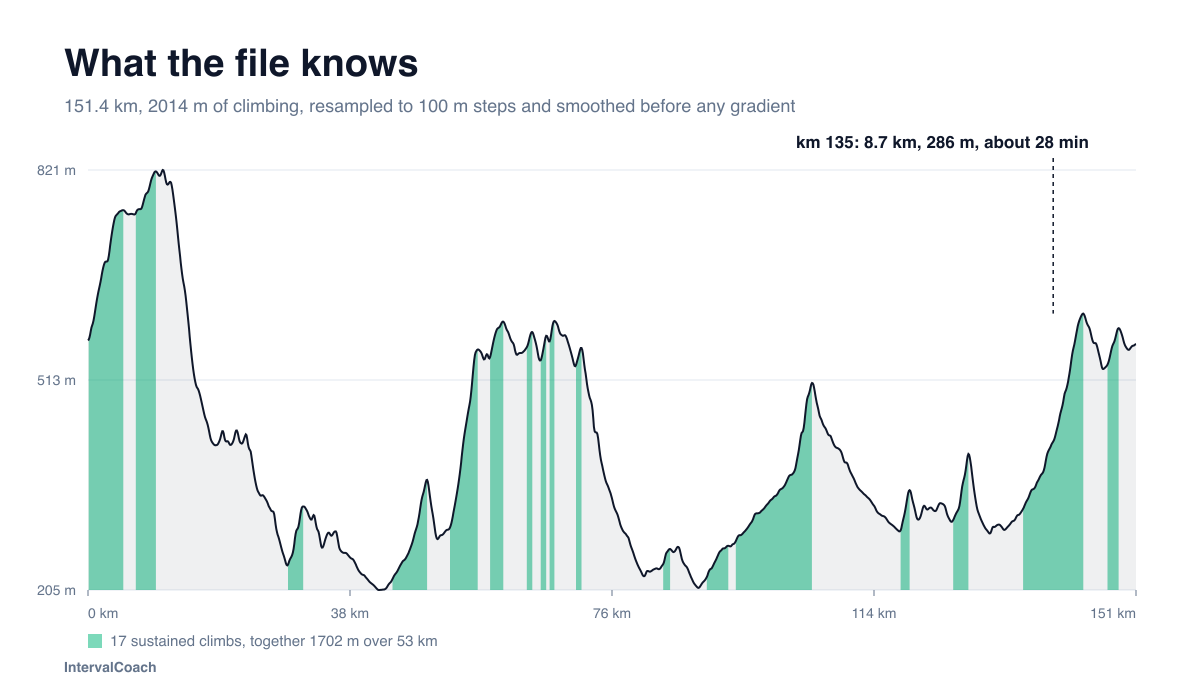
It gets more specific. For a rider at 246 W, the climbs on that route last two to five minutes (six of them), five to twelve minutes (six), twelve to thirty minutes (four), and one runs past half an hour. Not one of them is under two minutes. There is no point on this course where a thirty second effort decides anything, which is a training prescription in itself.
And the hardest one is at the end. The biggest climb by height gain starts at kilometre 135, runs for 8.7 kilometres, and takes that rider about 28 minutes. "2,014 metres of climbing" will never tell you that you meet it with six hours in your legs.
First, the course becomes readable
The race in your calendar now shows the elevation profile, the total climbing and descending, and every sustained climb with its length, height gain and average gradient. Shared races show the same thing on their public page, with a GPX download.
Getting those numbers right takes more care than it looks. GPS altitude wanders between points, and a gradient worked out from one point to the next inherits every wobble. On one recorded ride file I tested this on, two points sit seven centimetres apart with a metre of altitude between them, and the honest point-to-point answer is a gradient of 4,654%. Run the same file through resampling to fixed 100 metre steps and elevation smoothing, and its steepest slope is 9%, which is a hill you can actually ride up.
A planning export like that Harz route is better behaved, and even there the raw maximum of 14% settles to 12% once the noise is out. Every profile, climb and gradient IntervalCoach shows you comes from the processed version, and a climb has to run at least 300 metres and gain at least 20 metres before it is called one, so a route with four climbs is not reported as thirty.
Second, your training starts preparing for those climbs
This is what the original request was about, and it is what a total elevation figure can never give you.
IntervalCoach estimates how long you will be on each climb, using your own threshold power or pace rather than the distance alone, and feeds those durations into the sessions it picks for you. When the climbs that decide your race run eight to twelve minutes, threshold repetitions of that length move up the list. Repetitions longer than your longest climb move down it.
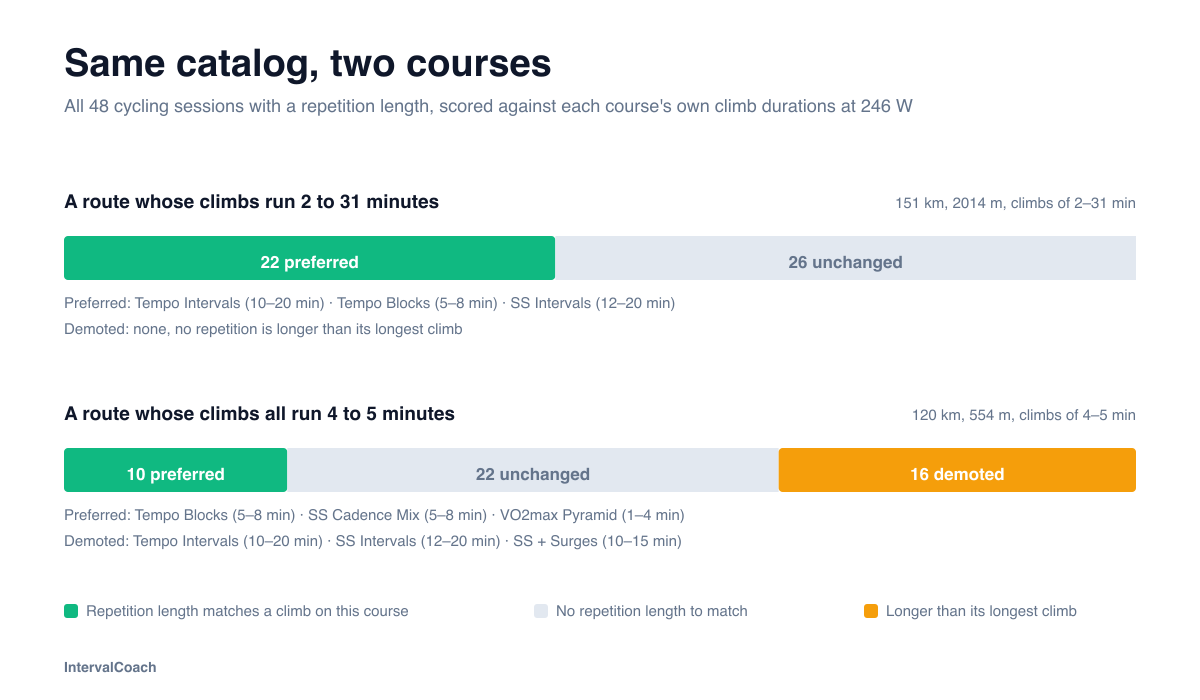
That cuts both ways. On a route whose climbs all run four to five minutes, the same catalog loses sixteen sessions from favour, every long threshold block among them: a 2x20 at FTP prepares you for a climb this course does not have.
It is a preference and not an instruction. Your recovery comes first, your training phase comes first, and the course is never a reason to add intensity to your week. A course with a thirty minute climb does not earn you a thirty minute threshold block in a recovery week.
The same course, different priorities for each athlete
Climb duration tells the coach which efforts matter. Your Athlete Profile helps establish where your preparation should start: recent power or pace performances compared with your own best, alongside the training you have recorded.
The preparation view on your personal race page brings those together. It identifies the capabilities relevant to the course, shows which deserve development attention, and suggests training for them. For the Harz route, that includes endurance for the whole day, sustained work for the longer climbs and repeat efforts for the sequence of shorter climbs. An athlete already close to their own best can maintain that capability; another with a supported gap can give it more attention within their plan.
These priorities feed session selection alongside the climb durations. As new training data arrives, the assessment is refreshed. Available weekly profile history shows how your measured capabilities have changed, so you can follow preparation over time. Your FTP, pace zones and Athlete Profile scores remain measurements of you; attaching a demanding course does not change them.
The late climb gets its own context too: how far into the estimated day it starts, and whether recent recorded sessions reach the relevant duration. A fresh best effort and experience several hours into a ride answer different questions. Where that longer-session evidence is missing, the view shows it.
Third, race day is planned on the actual course
The race page splits the course into its climbs, descents and flats, and gives each segment an estimated time, a power target for rides or a pace for runs, and a carbohydrate and fluid budget.
For that Harz route at 246 W it comes out as 193 segments, 50 of them climbs, over an estimated 6.5 hours: 180 W on the flat, up to 194 W on the climbs, and 111 W on the descents. Climbs inside the first hour are held to 185 W, because the first hour is capped whatever the terrain offers.
The length of the day moves with it. Told only that the race is 151 kilometres, IntervalCoach expects that rider to be finished in 4.8 hours and budgets 434 grams of carbohydrate. Told what those 151 kilometres contain, it expects 6.5 hours and 585 grams. An hour and a half of riding, and 150 grams of food, were sitting in the part of the race that no number on an entry form describes.
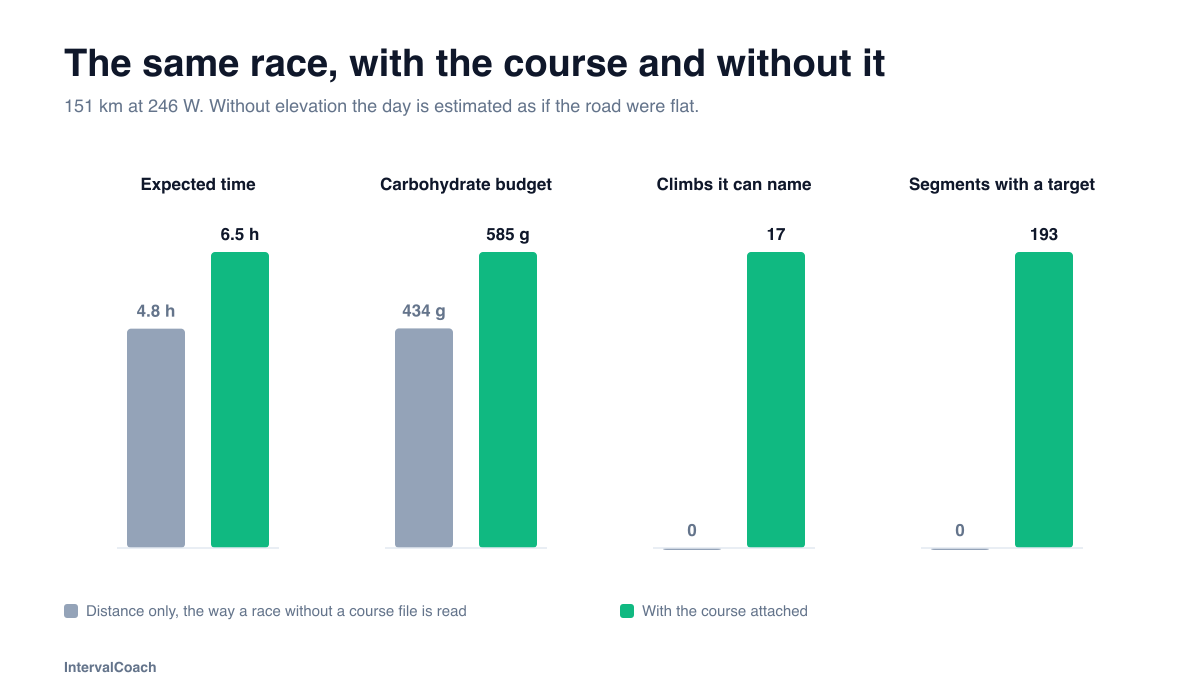
The fuel numbers follow the same split. 90 grams of carbohydrate and 600 millilitres an hour becomes 585 grams and 3.9 litres across the day, spread over the segments in proportion to the time you spend in them. 515 of those 585 grams fall before the climb at kilometre 135, which is the number that actually matters: by the time you reach the hardest climb of the day, almost all of your eating should already have happened.
Descents are deliberately conservative. A steep descent is treated as road you have to cover rather than free speed to claim back, and the plan never asks for a hard effort on one.
And the next athlete gets it too
If you share your race to the community catalog, the course goes with it. Once the race is approved it appears on its public page with the profile, the climb list and a GPX download, and any athlete who adds that race to their calendar inherits the course and everything above.
That is the part that compounds. Most races publish no course data anywhere, and the ones that do bury it in a PDF. One athlete with the file is enough for everybody else preparing for the same start line.
How to attach one
Open Calendar or Training Plan, choose Add race, and create your own race. In the form there is an upload for a GPX or FIT file of up to 40 MB, and under it a field for an Intervals.icu route ID. Distance, climbing and the start location fill in from the file. A race already on your calendar works the same way: open it, edit it, and attach, replace or remove the course there.
Your file stays private to your account. We keep the route and its elevation and drop the activity data the recording carried, so a GPX exported from a ride brings no heart rate, power or timestamps into what we store. Sharing the race to the catalog is what makes a course public, and deleting your account deletes the file with it.
The help center article has the step-by-step version, including what to do when an Intervals.icu route comes in without elevation.
Frequently asked questions
Can I upload a GPX file to IntervalCoach?
Yes, with Race Recon. When you create a race in IntervalCoach, or edit one you already have, you can attach a GPX or FIT file of up to 40 MB, or import a route you have ridden on Intervals.icu by its route ID. The distance, total climbing and start location are filled in from the file. Race Recon is included in Pro and Max, and in the free trial.
What is Race Recon?
Race Recon is the IntervalCoach feature that reads the course file of a race on your calendar. It shows the elevation profile and the list of sustained climbs, it uses the length of those climbs when it chooses your interval sessions in the weeks before the race, and it splits the course into climbs, descents and flats with an estimated time, a power or pace target and a carbohydrate and fluid budget for each segment. It is included in Pro and Max.
Why do GPX files show impossible gradients?
Because GPS altitude wanders by a metre or two between points, and a gradient calculated from one point to the next inherits every wobble. On a recorded ride whose points sit centimetres apart, that arithmetic can report thousands of percent. IntervalCoach resamples every file to fixed 100 metre steps and smooths the elevation before deriving any gradient, so the number you see is the slope you will actually ride.
Does a hilly course make my training harder?
No. The course changes which sessions are preferred, not how much work you do. If your race is decided on eight to twelve minute climbs, threshold repetitions of that length move up the list and repetitions longer than your longest climb move down. Your recovery, your training phase and your chosen methodology still come first, and the course never adds intensity of its own.
Does Race Recon show what I should develop for my race?
Yes. On your personal race page, course demands are compared with your recent measured power or pace and training history. The preparation view shows relevant development priorities, training suggestions and changes from available weekly Athlete Profile history. Those priorities inform session selection within your existing training plan. The assessment is refreshed as training data changes, and missing evidence is shown as unknown.
Can I import a route from Intervals.icu?
Yes, by its route ID. A route on Intervals.icu carries no elevation of its own, so IntervalCoach reads the elevation from one of your own recorded rides on that route. If you have never ridden it, upload the GPX file instead.
What happens to my course file?
It stays private to your account, with the route and elevation kept and the activity data from the recording stripped out. If you share the race to the community catalog, the course becomes part of that public race page after moderation, including a GPX download. Deleting your account deletes the file.