Your race course, read into your training
Attach the GPX or FIT file of your race. Race Recon finds every sustained climb, works out how long you will be on each one, and carries that into your sessions, your pacing and your fuelling.
Included in Pro and Max. Try it in the 14-day free trial, no credit card required.
A distance tells you how long the day is. The course tells you how it goes.
A race on your calendar is usually a name, a date and a distance. Where the climbs are, how long you will be on each one, and whether the hardest one comes at kilometre 20 or kilometre 135 is information no entry form carries. Race Recon reads it from the course file itself.
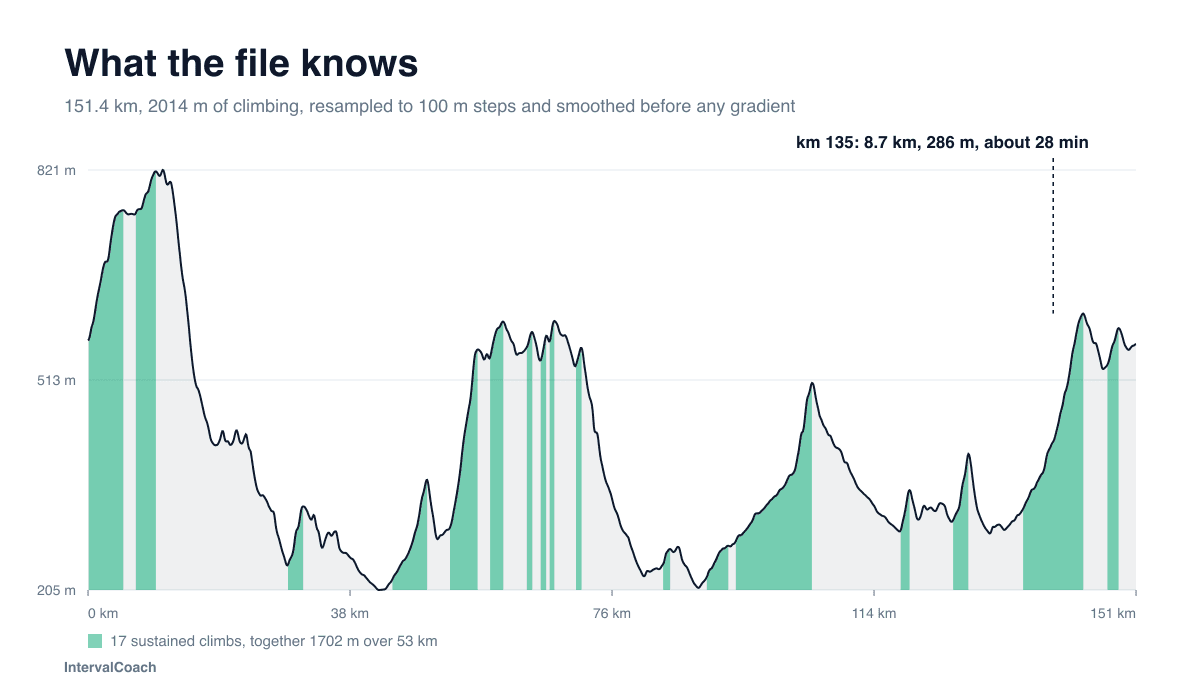
A 151 km route through the Harz. Seventeen sustained climbs hold 1,702 of its 2,014 metres of climbing, and the biggest one starts at kilometre 135.
What Race Recon does
Every climb, measured
The race shows its elevation profile, total climbing and descending, and each sustained climb with its length, height gain and average gradient. Every file is resampled to 100 metre steps and smoothed first, so GPS noise does not turn into impossible gradients.
Training matched to your climbs
Race Recon estimates how long you will be on each climb at your race pace. Interval sessions of that length move up the list, and blocks longer than your longest climb move down. Your recovery and training phase still come first, and the course never adds intensity to your week.
What to develop for this race
Your personal race page compares what the course asks with your recent power or pace and your training history. It shows which capabilities deserve attention, suggests training for them, and marks missing evidence as unknown.
Race day, segment by segment
The course is split into climbs, descents and flats. Each segment gets an estimated time, a power target for rides or a pace for runs, and a carbohydrate and fluid budget, so you can see how much of your eating should happen before the hardest climb.
Wind and surface
Closer to race day, wind forecasts are read against the direction of the course to mark headwind, tailwind and crosswind stretches. You can also opt into surface analysis to see paved, gravel and unpaved sections, which feeds the estimated cycling duration.
Shared courses for the next athlete
Share your race to the community catalog and, after moderation, its course appears on the public race page with a GPX download. Anyone who adds that race to their calendar gets the course with it.
What the course changes
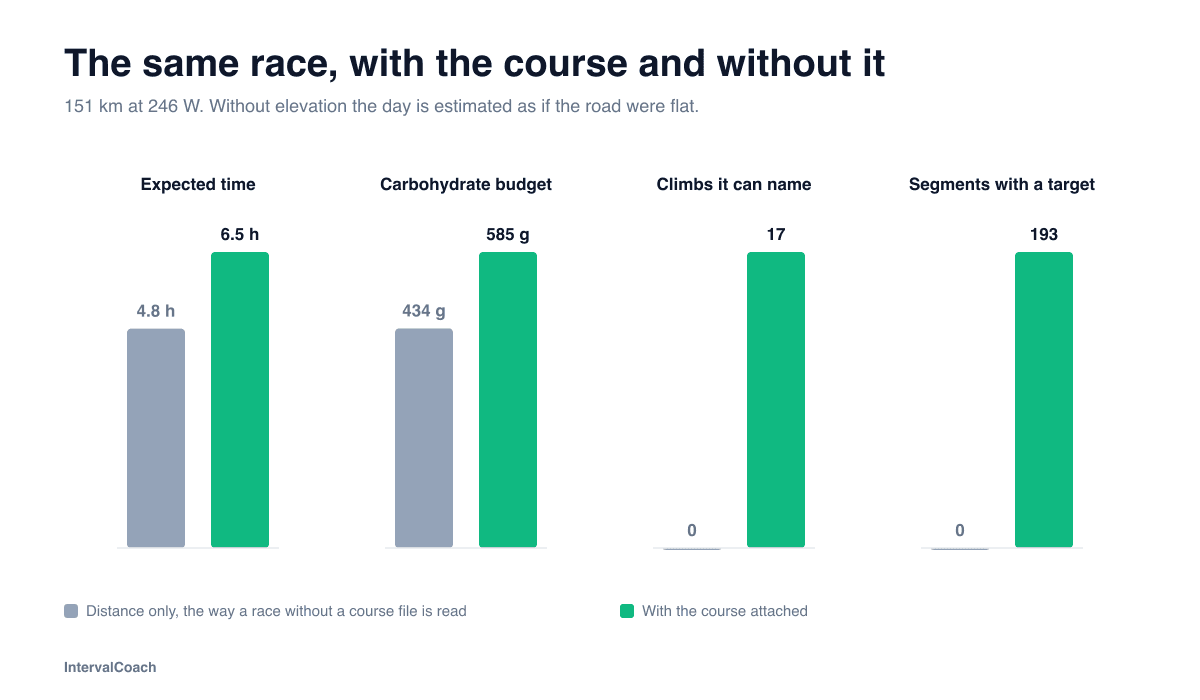
Told only that a race is 151 kilometres, IntervalCoach expects a rider at 246 W to finish in 4.8 hours and budgets 434 grams of carbohydrate. Given the course, it expects 6.5 hours and 585 grams, spread over 193 segments.
How to attach a course
- 1
Open Calendar or Training Plan and choose Add race, or open a race already on your calendar and edit it.
- 2
Upload a GPX or FIT file of up to 40 MB, or enter an Intervals.icu route ID.
- 3
Distance, climbing and start location fill in from the file. The profile, climbs and race plan follow.
The course stays private to your account. We keep the route and its elevation and drop the activity data the recording carried, so no heart rate, power or timestamps are stored. Sharing the race to the catalog is what makes a course public, and deleting your account deletes the file.
As featured in the5krunner
Frequently asked questions
Can I upload a GPX file to IntervalCoach?
Yes, with Race Recon. When you create a race, or edit one you already have, you can attach a GPX or FIT file of up to 40 MB, or import a route you have ridden on Intervals.icu by its route ID. The distance, total climbing and start location are filled in from the file. Race Recon is included in Pro and Max, and in the free trial.
Does a hilly course make my training harder?
No. The course changes which sessions are preferred; the amount of work stays the same. If your race is decided on eight to twelve minute climbs, threshold repetitions of that length move up the list and repetitions longer than your longest climb move down. Your recovery, your training phase and your chosen methodology still come first.
Why do GPX files show impossible gradients?
GPS altitude wanders by a metre or two between points, and a gradient calculated from one point to the next inherits every wobble. IntervalCoach resamples every file to fixed 100 metre steps and smooths the elevation before deriving any gradient, so the number you see is the slope you will actually ride.
Does Race Recon work for running races?
Yes. Climb durations are estimated at your running race pace, and race-day segments carry a pace target instead of a power target.
Can I import a route from Intervals.icu?
Yes, by its route ID. A route on Intervals.icu carries no elevation of its own, so IntervalCoach reads the elevation from one of your own recorded rides on that route. If you have never ridden it, upload the GPX file instead.
What happens to my course file?
It stays private to your account, with the route and elevation kept and the activity data from the recording stripped out. If you share the race to the community catalog, the course becomes part of that public race page after moderation, including a GPX download. Deleting your account deletes the file.
Prepare for the course you will actually race
Start the free trial, add your race and attach its course.
Race Recon is included in Pro and Max. Browse races with shared courses in the race catalog.