Coaching that scales with your squad
Every athlete gets a plan that re-decides itself overnight against their recovery, their load and what they actually did. You set the direction, see the whole squad in one view, and spend your hours on the athletes who need you. Every seat includes that athlete's full Max plan, with the coach tooling on top.

Built for a squad of any shape
The unit is the seat, so the same plan fits one coach with a handful of athletes and a programme with a staff of three.
Independent coaches
The athletes you already coach, each on an individually adapting plan, with the daily decision made before you open the app. Start at three seats and add them as you sign people.
Teams and clubs
One roster for the whole squad, so a training group of twenty stops being twenty separate conversations. Members keep their own account and history if they leave the club, which is what makes people comfortable joining.
Talent programmes and federations
Coach capacity is the bottleneck in regional development: one coach, thirty athletes, one plan for everybody. Here every athlete still gets an individual daily decision while the staff sees the squad in one view. From forty athletes we price individually, with invoicing and several staff accounts.
What the tooling wins you
Not a replacement for coaching. A way to spend your judgement where it changes something.
Your roster stops being capped by your evenings
Writing next week for thirty athletes by hand is a full evening, every week, and it is the work that scales worst. The plan is generated from each athlete's goal, fitness, recovery and availability, and rewritten overnight when something changes. You review and correct rather than draft from nothing, so the number of athletes you can carry stops being set by how many plans you can type.
Every athlete's data, read the same way
HRV, resting heart rate, sleep, power and pace curves, adherence, ramp rate: all of it arrives as deviation from that athlete's own baseline rather than a raw number you have to hold in your head. The signal that matters is surfaced; the rest stays out of your morning.
A plan that survives contact with real life
An athlete sleeps badly, misses Tuesday, comes back from a cold, races on a whim. Every one of those normally means a coach rewriting the week by hand or letting the plan drift out of date. Here the session is re-picked overnight and you see what changed and why, so the plan on their calendar is one they can actually ride.
You stay the coach
Nothing is hidden behind the automation. Every adaptation is explained, you can override any session, set standing instructions per athlete, and talk to them in a shared Coach+ thread. Athletes see your edits attributed to you.
What changes when you coach here
The bottleneck in coaching is not knowledge, it's attention. Three things move that.
The daily decision is already made when you open the app
Each athlete's week comes from their goal, fitness, recovery and availability, and the sessions re-pick overnight when something changes: illness, a missed workout, a drop in HRV, a bad night. You are not rewriting thirty calendars on Sunday evening. You are correcting the handful that need a coach's judgement.
One view that says who needs you today
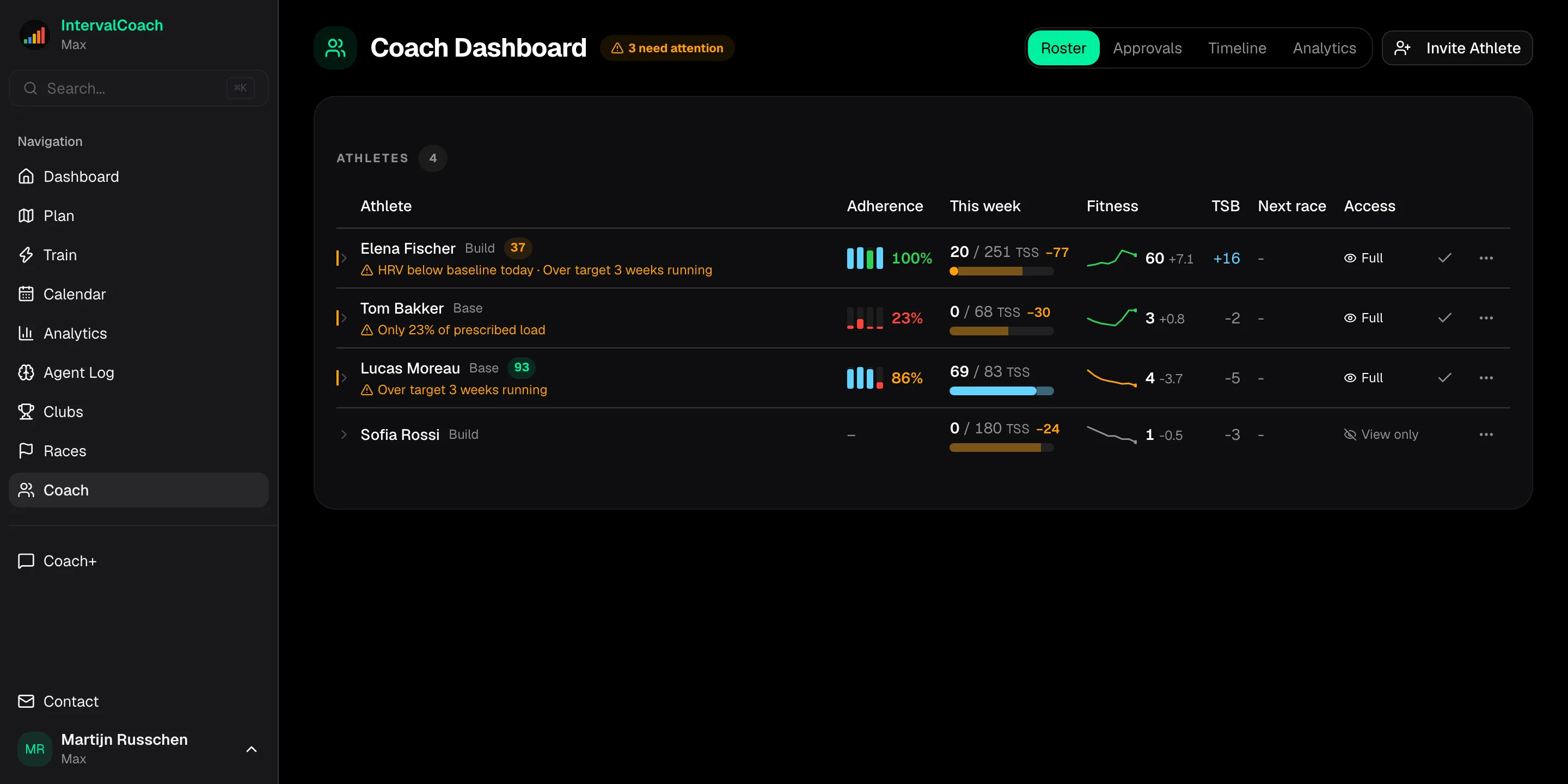
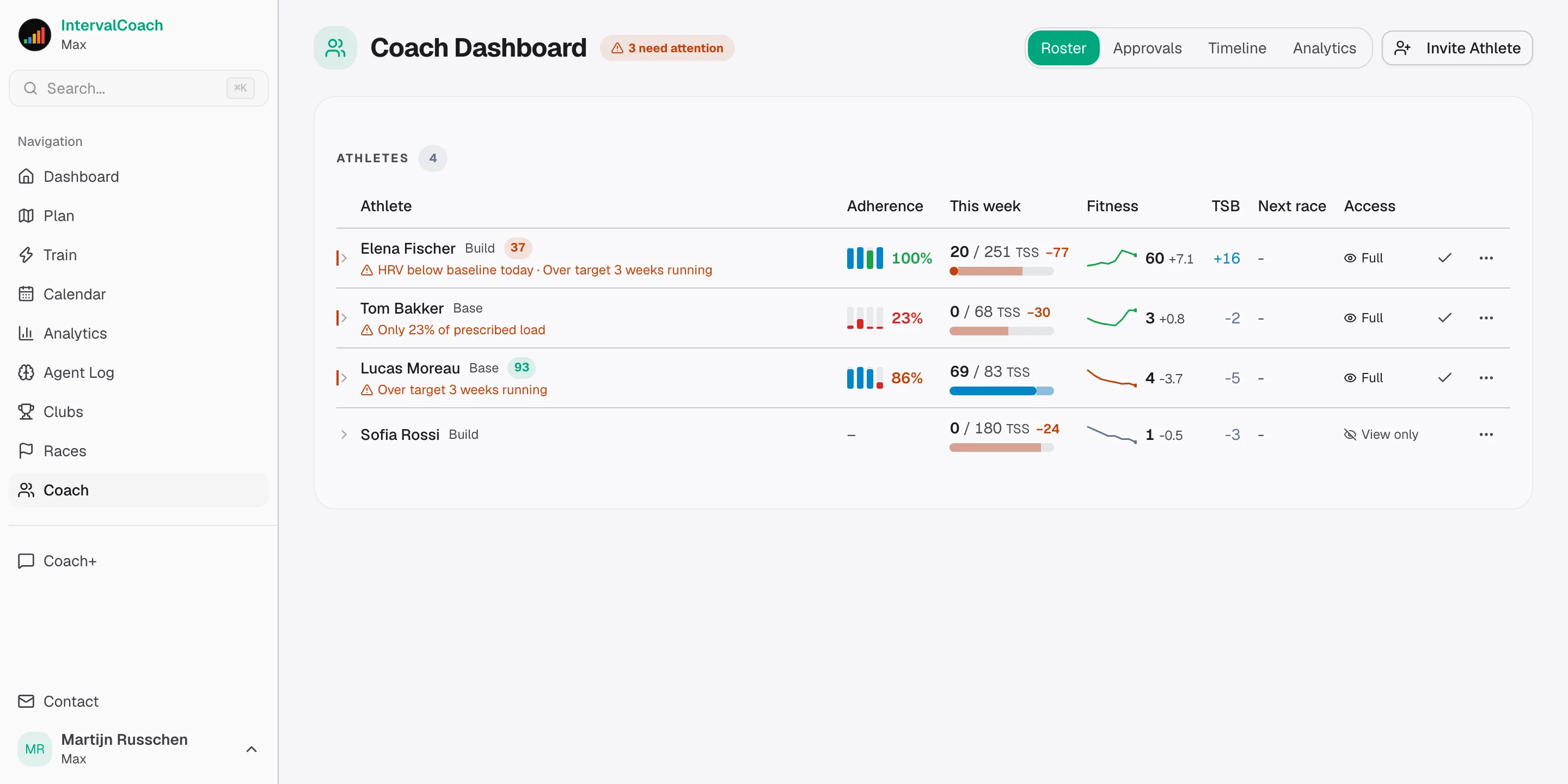
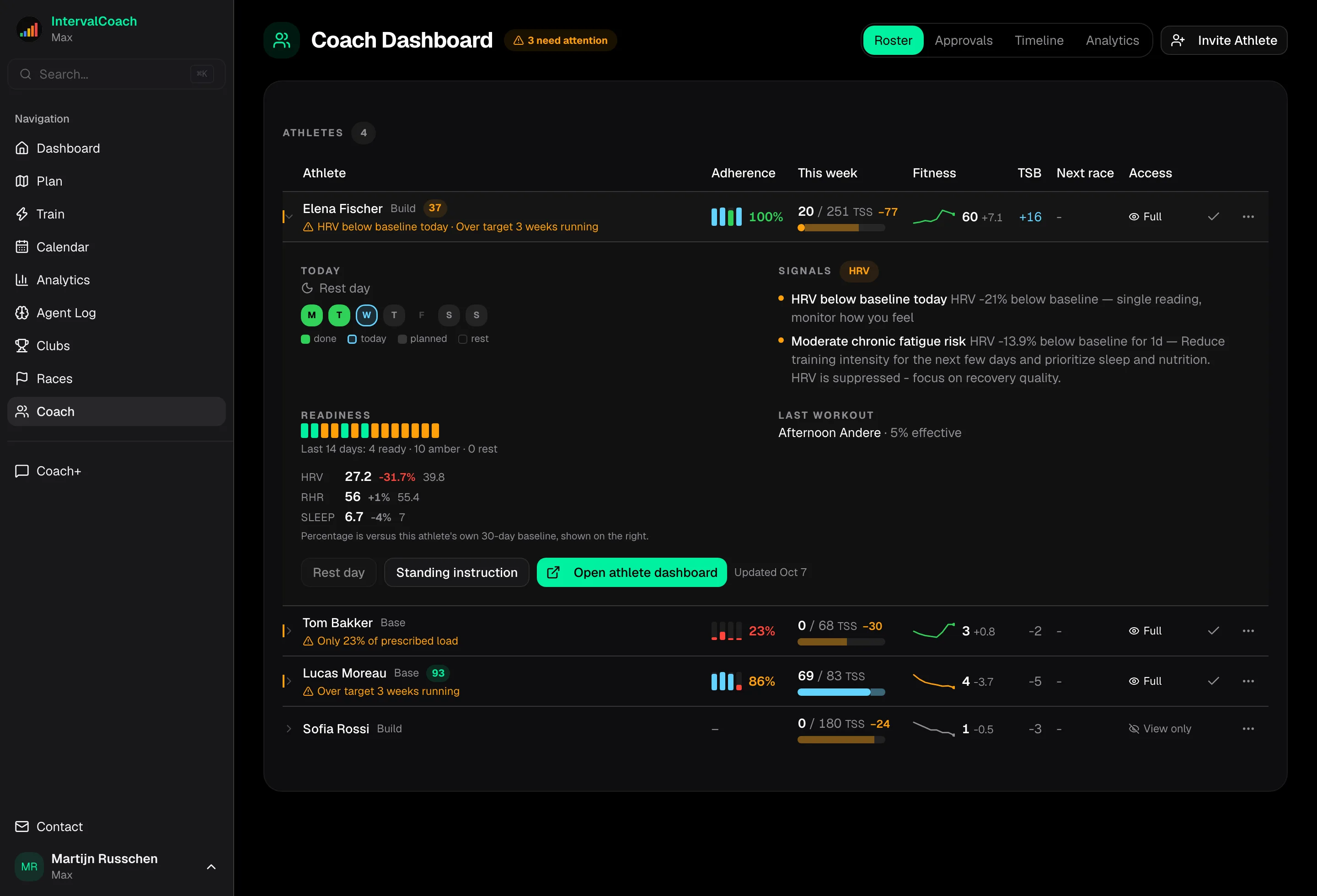
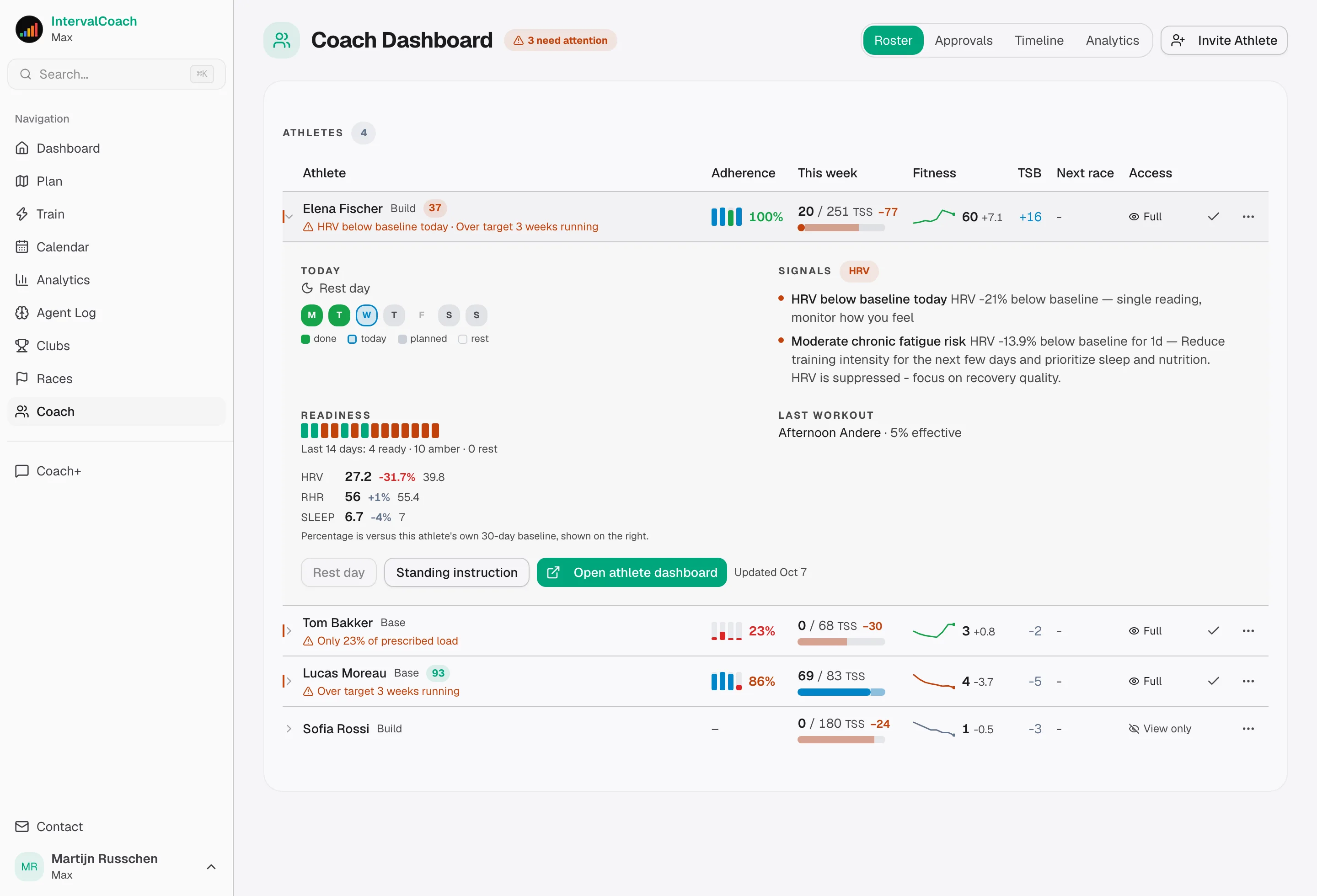
The roster sorts by what needs attention: deep fatigue, adherence slipping, a week falling behind target, a race coming up. Every biometric is shown as a deviation from that athlete's own baseline, because nobody holds thirty resting heart rates in their head. Handled items stay handled, so the list doesn't turn into wallpaper.
Cycling, running, triathlon, swimming, strength
One platform for athletes who do more than one sport. Power, pace, heart-rate and CSS zones stay calibrated against current fitness, so threshold work in one sport is never prescribed at last season's numbers in another.
What you get on top of their Max plans
Your athletes' subscriptions give them the daily coaching. The Coach Plan adds the layer none of them can see: the one that tells you where to spend your morning.
Today's attention list, with the reason attached
The roster sorts itself by who needs you: a critical signal, deep fatigue, adherence slipping, data gone stale, an adaptation waiting for approval. Mark an athlete handled and they drop out of the list, and stay out until the reason itself changes rather than until the number moves.
Biometrics you can actually read across a squad
HRV, resting heart rate and sleep arrive as today's deviation from that athlete's own 30-day baseline, plus a fortnight of readiness scores as a strip. Nobody holds thirty resting heart rates in their head, and 57 bpm means nothing until you know whose it is.
Prescribed against actual, four weeks back
Load adherence per athlete over the last four completed weeks, and this week's forecast: done, still scheduled, and the shortfall against target. Weekly CTL from stored snapshots gives you the direction rather than today's number.
What changed since you last looked
New athletes, attention raised and cleared, adherence dropped or recovered, a week target moved, a race added. You open the roster and read the delta instead of re-reading twenty athletes.
Work inside any athlete's account
Switch into an athlete and use everything they have: edit the weekly plan, swap or rebuild workouts, change a session step by step in the workout builder, move the goal event, and use Coach+ on their behalf in the thread you both share. Full access or view-only, and the athlete sets which.
One approvals inbox for the whole squad
When the overnight adaptation wants to change a session and you have asked to approve first, every pending change across your roster lands in one list: what was planned, what is proposed instead and why, with the athlete’s readiness beside it. Approve one, keep the original, or approve them all. Athletes can still decide from their own dashboard, and whoever is first wins.
The season, side by side
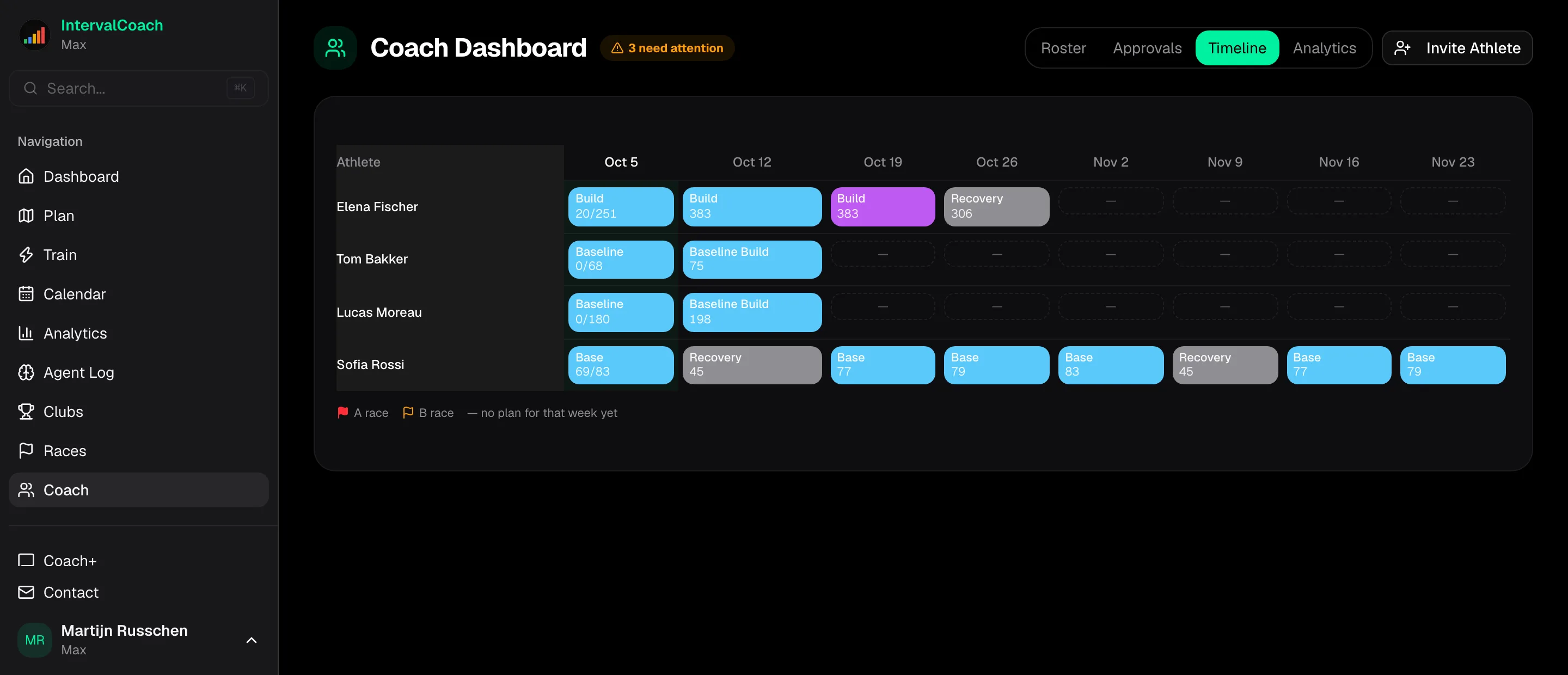
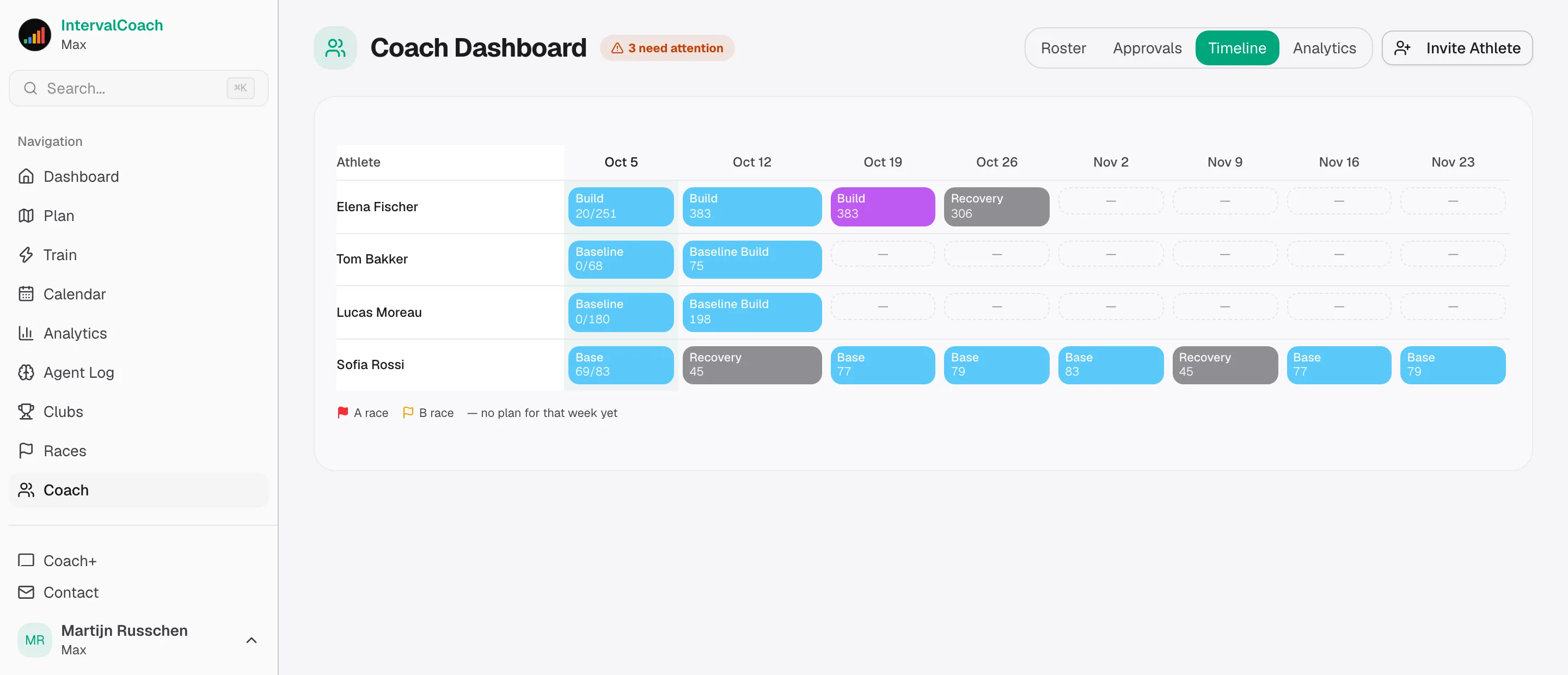
Eight weeks of the whole squad on one grid: builds, tapers, recovery weeks, races with their flags, and how the current week is actually going for each athlete. Whose peak collides with whose rest week is visible before it happens.
Squad analytics that read the group honestly
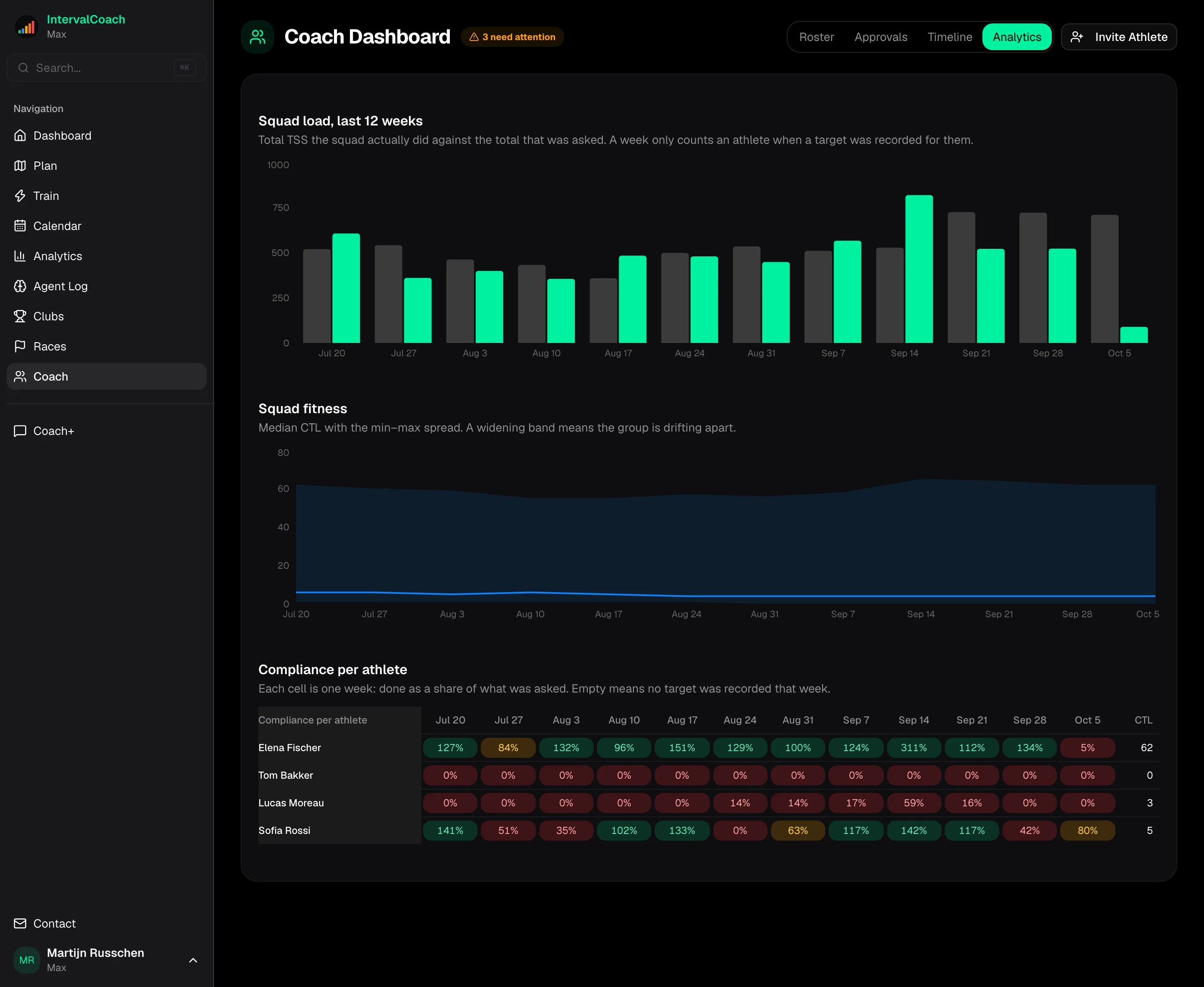
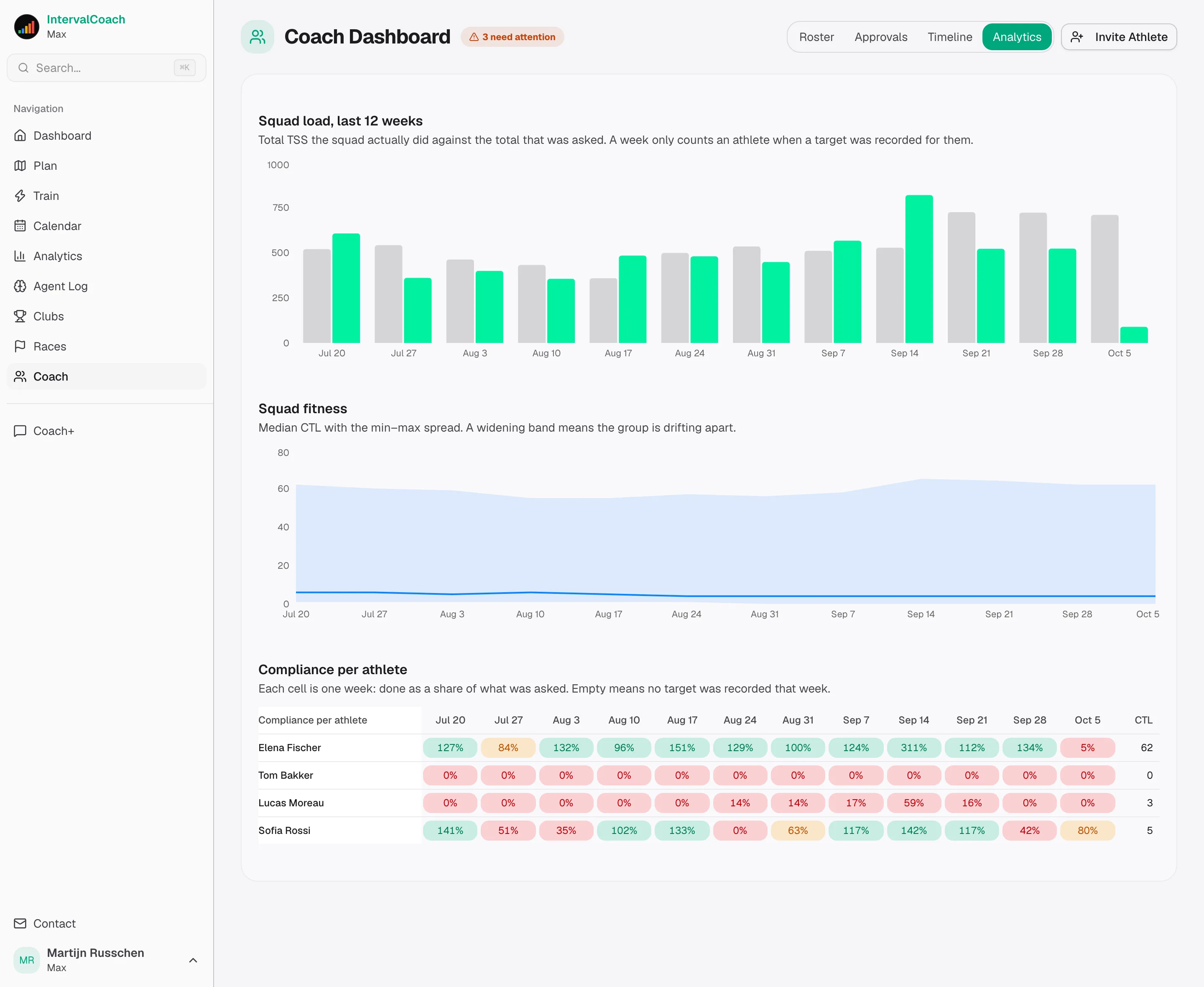
Twelve weeks of load the squad did against what was asked, compliance per athlete per week so you can see who carried the number and who disappeared, and squad fitness as a median with the min–max spread. An average is what one outlier drags around; the spread is the signal.
Monday morning, in your inbox
Every Monday at seven local time, the squad digest: who needs attention first and why, last week against plan, and every race in the next fortnight. It reads the same data as the roster, so the email and the dashboard can never tell different stories.
How it works
You buy seats; each seat carries one athlete. Setting one up takes a minute.
- 1
Start a Coach Plan
Plans start at three seats. The per-athlete price drops as your roster grows, and you can add or drop seats whenever your roster changes — we bill the difference, prorated.
- 2
Put an athlete in a seat
You send the invite, by email or as a link. Your athlete signs in, accepts, and the seat covers their entire subscription: full plan, daily adaptation, Coach+ chat, all of it. They pay nothing and enter no card.
- 3
Choose full access or view-only, per athlete
View-only when you want a second pair of eyes on someone who mostly self-coaches. Full access when you want to edit the weekly plan, swap workouts and move the goal yourself. Every edit is attributed, so the athlete always sees what changed.
- 4
Work the roster, not the calendar
Start the day on the attention list, act from the row, and use the shared Coach+ thread for the conversation. The plan keeps running underneath in between.
What a seat costs
A seat is two things at once, and your athletes pay nothing for either. Plans start at three seats, every seat moves to the lower price as your roster crosses a band, and yearly billing gives you two months free.
For your athlete: the full Max plan
The same €8 subscription they would otherwise buy: a plan that adapts when the data calls for it, eight weeks of workouts scheduled ahead, 200 Coach+ messages a month, race pace plans, Race Recon for their race courses, performance benchmarks, AI drafting and review in the workout builder, and the AI assistant connection for Claude, ChatGPT or Cursor. They enter no card and never see a bill.
For you: the coach tooling on top
The roster with today's attention list, adherence and readiness per athlete against their own baseline, the squad view, and full or view-only access to edit their plan and chat on their behalf.
Your athletes pay nothing.
| Athletes | Per athlete | Per month |
|---|---|---|
| 3–4 | €10 | €30–40 |
| 5–14 | €8 | €40–112 |
| 15–39 | €7 | €105–273 |
| 40+ athletes | Let's talk | |
What would your roster cost?
That is exactly what those athletes would pay for Max on their own, at €80. The coach tooling comes with it, and they never see a bill.
Clubs, regional programmes and federations are priced individually — invoicing, several staff accounts, and a rate that matches the size of the squad.
Still weighing it up?
How IntervalCoach fits alongside Intervals.icu, how it compares with the other coaching tools, and where each of them is the better choice.
For coaches on Intervals.icu
Keep Intervals.icu as your calendar and analysis tool, and add plans that adapt daily and a squad view that tells you who needs you.
The best software for endurance coaches
A guide to the coaching platforms: who pays, what a roster costs, and what each one does well.
Compare IntervalCoach with
Common questions
Who pays, and how much?
You do, per seat: €10 per athlete up to four seats, €8 from five, €7 from fifteen, and an individual price from forty. Every seat carries the €8 Max subscription for that athlete plus your coach tooling, so from five athletes on you are paying about what they would have paid alone and the coach side comes with it. Plans start at three seats, yearly billing is two months free, and your athletes pay nothing at all.
What does my athlete share with me?
The surfaces they see themselves: dashboard, weekly plan, calendar, activity history, analytics and the Coach+ thread. Nothing outside the app — no payment details, and nothing they haven't enabled for sharing.
Can I change the plan, or only watch?
Both, and the athlete picks per coach. View-only is read-only everywhere. Full access lets you edit the weekly plan, swap or modify workouts (step by step in the workout builder), change the goal event and adjust training preferences. Every edit is attributed and visible in the athlete's history.
My athlete already pays for IntervalCoach. Do they pay twice?
No. The moment your seat covers them, their own subscription is paying for access they already have, and we tell them so in their settings. They cancel it and keep everything.
Is Coach+ shared between us?
Yes. The thread is shared, so the athlete sees what you asked and you see what they asked. The seat carries the athlete's message allowance; you don't need a separate quota.
What happens if I stop paying, or an athlete leaves?
Cancel the plan and coach access pauses, but nothing is deleted: your roster and every athlete's history stay exactly as they were, and it all comes back when you start a plan again. Release a single seat and that athlete keeps their account and their data, and can carry on with a subscription of their own. Athletes can also end the connection themselves at any time, from their own settings.
Do I need an Intervals.icu account?
Yes — IntervalCoach reads training data from Intervals.icu, so both coach and athlete need an account. It's free and connects to Strava, Garmin, Wahoo and more. Whoop, Apple Health and Google Health are optional and add recovery signals to the plan.
Start with three seats
Sign in, start your Coach Plan, and invite your first athletes. Athletes who don't have an account yet can create one during the invite.
Add or drop seats whenever your roster changes.