We rebuilt the way IntervalCoach shows a single session, from the data it reads to the way it lays it out. A completed ride now arrives with everything around it: the plan it belonged to, how you woke up that morning, the wind you rode into, and what it did to your fitness and form. A planned session shows, before you start, what it will do to your week, the weather across the hours you will be outside, and what to eat when.
All of it is live for every athlete from today. Tap any activity or session on the dashboard, the calendar or the Training Plan page.
The same ride, read two ways
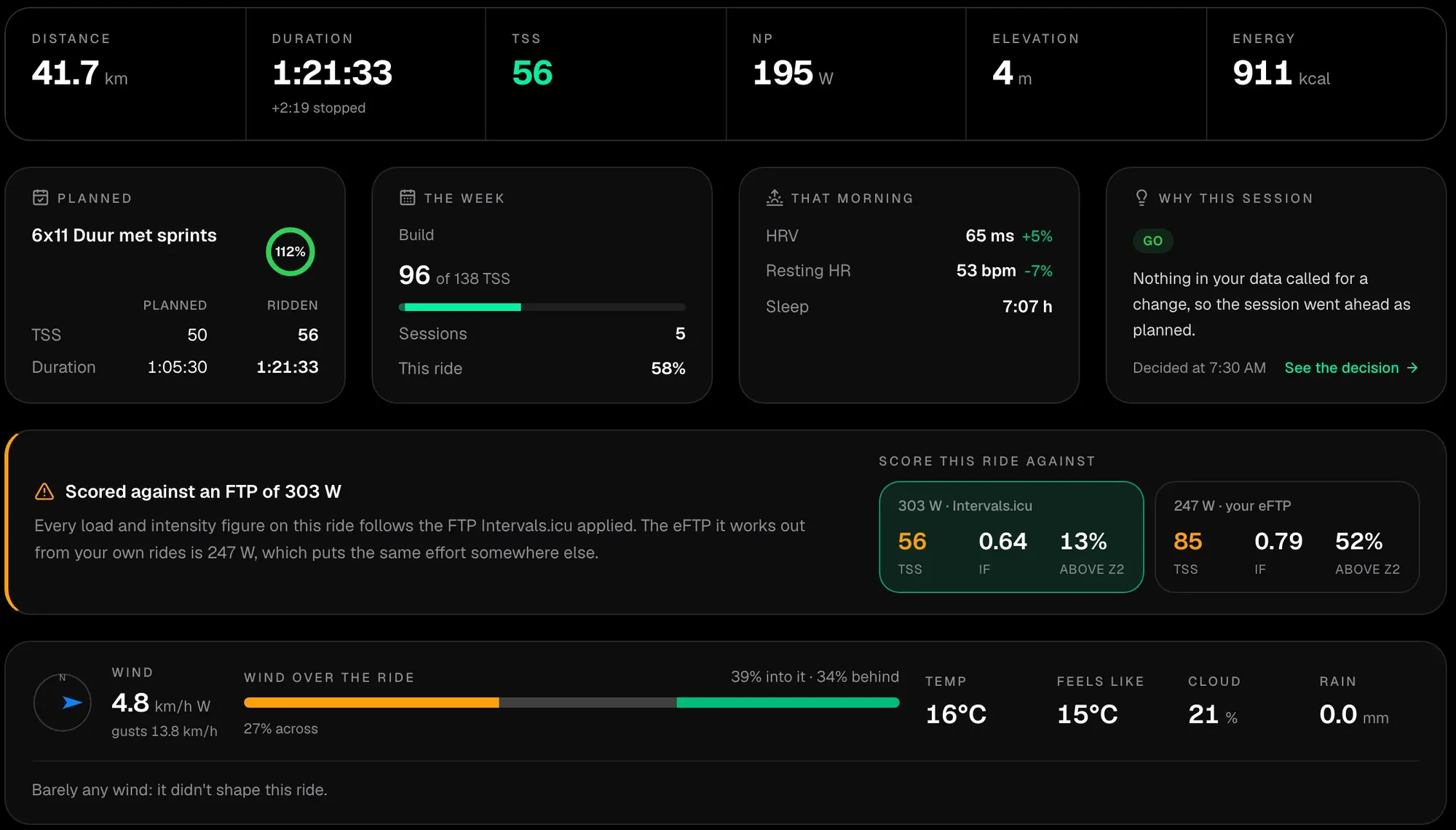
Take an 82-minute ride on flat roads. In Intervals.icu it scores 56 TSS at an intensity factor of 0.64: a comfortable endurance ride, measured against the 303 W FTP set there.
The athlete's eFTP, estimated from recent riding, was 247 W that day. Measured against that, the same ride is 85 TSS at 0.79, closer to a steady tempo ride than to an easy spin. Which one is right decides whether this ride was easy aerobic work or a real load on your week.
The activity page now shows both whenever the two values are 8% or more apart. Each option carries its training load, its intensity and the share of the ride above endurance, and choosing one moves the zones and the planned targets with it. It does not decide for you, because an eFTP measures the efforts you made recently, which is not always what you are capable of. It shows the difference so you can see when it matters.
A completed session, in its context
A ride on its own is a set of numbers. The page now puts it back into the day and the week it happened in.
- The plan. The planned session it completed, how closely you followed it, and the planned structure drawn against what you actually did.
- Your week. The week's load against its target, how many of its sessions are done, and where you are in your training phase.
- That morning. Your readiness, with HRV and resting heart rate against your own 30-day baseline, and any sleep debt you started with.
- Why this session. The readiness call IntervalCoach made that day, with a link to the decision behind it.
- The conditions. Temperature, rain and the wind, split into how much of the ride went into it, across it and with it.
What it did to you
- Fitness, fatigue and form, before and after, so you see where the session left you.
- Recovery. An estimate of how long the session takes to recover from, with recovery nutrition for the hours after it, and a plain explanation when there is no recovery curve to show.
- Time in each zone against what the session asked for, one row per zone, each scaled to its own numbers so thirty seconds of sprinting is as readable as forty minutes of endurance. Zone times use the same smoothing Intervals.icu applies, so the two closely agree.
- Deeper power and heart rate figures: power per kilo, how much of your anaerobic reserve (W′) you used, work above threshold, strain, heart rate as a share of your threshold heart rate, and how far your heart rate drifted against your output. When training load by power and by heart rate disagree, the page explains why.
- Your power curve for the session, with the best 20 minutes marked.
Every number, with room to read it
- One trace for every channel. Power, heart rate, speed, cadence and elevation on one shared time axis, with a readout that follows your cursor, or your finger on a phone.
- The complete interval table, every lap and detected effort.
- Splits for runs and walks: pace, heart rate and climb for every kilometre or mile.
- A route profile for outdoor rides, runs and hikes, with every climb, your time, power, heart rate and VAM on it, and the time you spent climbing, on the flat and descending.
- The coach's analysis. On Pro, Max and the trial, the written analysis sits next to the numbers it talks about, with its verdict on effectiveness, difficulty and stimulus, and questions you can send straight to Coach+.
Before you ride: what a session will do
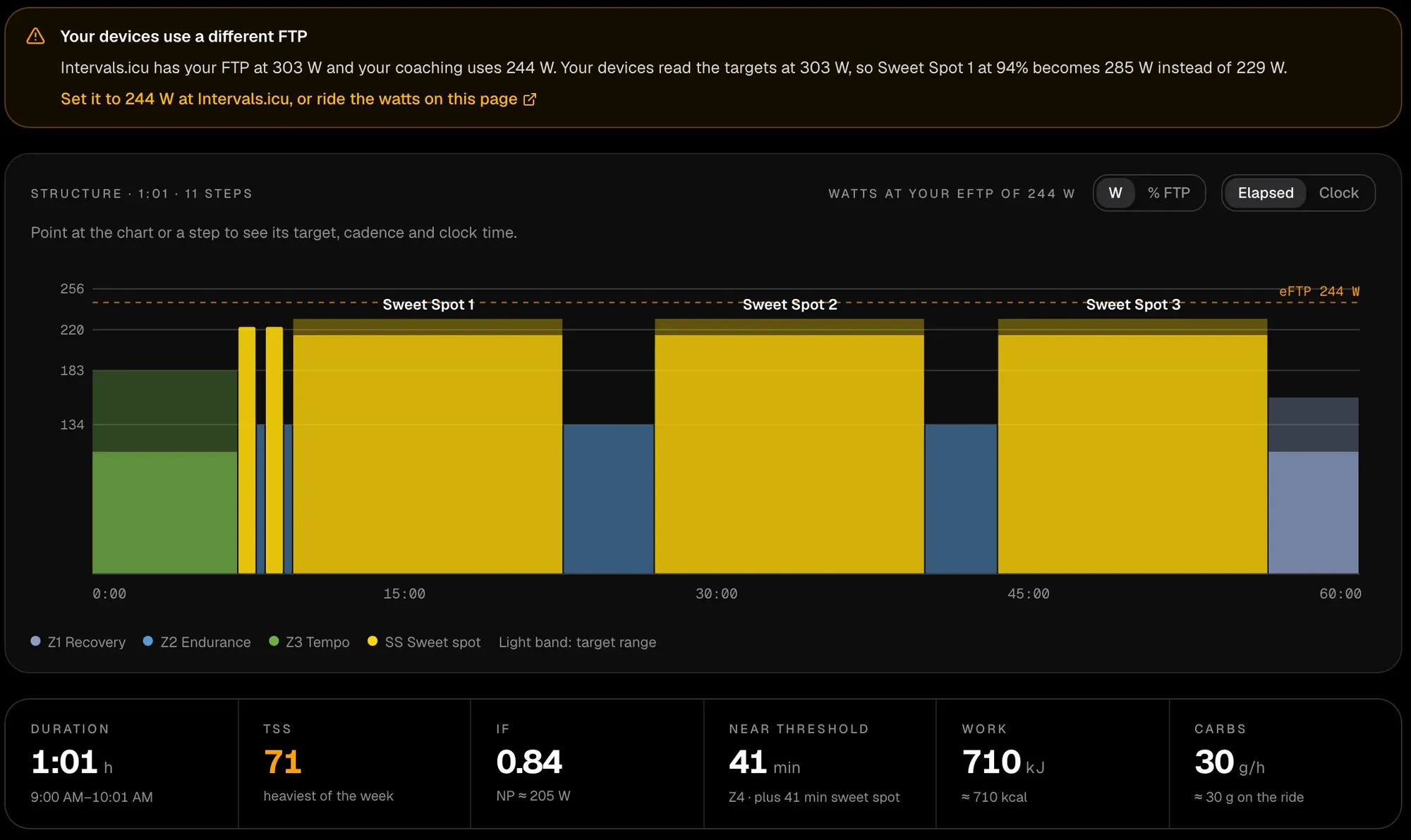
A planned session now gets the same depth before you do it.
- The session in numbers. Its structure on a timeline with every step's target and cadence, its training load, intensity, time at threshold and above, energy, and carbohydrate per hour and in total.
- What it does. Why it was chosen, how it fits your week's target, and what it will do to your fitness, fatigue and form.
- Warnings before they cost you a session. A second session on the same day, or an FTP in Intervals.icu that differs from the one your coaching uses, with the hardest step shown at both.
- The weather across your hours outside, not just at the start: wind, when the rain arrives, UV and what to wear, for the start time you set.
- Fuelling on the session's own timeline, so you know what to eat and when.
- Your previous similar sessions, to see how the last ones went.
- Where it goes. Which platforms, such as Garmin or Zwift, receive it, with the last upload. If a connection has uploads switched off, the page says so. You can also download it as a .zwo, .erg, .mrc or .fit file.
- One place to change it: move it, swap it, switch it between indoor and outdoor, or set its start time.
Before a race
A race on your calendar gets its own page too, with a countdown, the course and your fuelling for the distance. On Pro and Max it adds the pacing plan, how you fade over long efforts based on your own rides, and, in the last week, the days before the race with carb loading sized to your weight.
On every plan
The activity, session and race pages are on every plan, including free. The coach's written analysis, and a race's pacing plan, race week and fade, are part of Pro, Max and the free trial.
Frequently asked questions
What does the IntervalCoach activity page show?
For a completed session, the activity page shows the planned session it completed and how closely you followed it, your week's load against its target, your readiness, HRV, resting heart rate and sleep that morning, why the session was chosen, the wind and weather you rode in, your fitness, fatigue and form before and after, an estimate of your recovery, every chart with a shared readout, the complete interval table, time in each zone against the time the session asked for, splits for runs and walks, and a route profile with every climb for outdoor sessions. On Pro, Max and the trial it also carries the coach's written analysis.
Why does IntervalCoach show my ride at two different FTPs?
When the FTP set in Intervals.icu and your eFTP are 8% or more apart, the activity page offers both and shows the training load, intensity and zones at each. The two can tell a different story about the same ride: one 82-minute ride came out at 56 TSS and an intensity factor of 0.64 at a 303 W FTP, and 85 TSS and 0.79 at a 247 W eFTP. Below that gap there is no switch, because the answer would barely change.
What does a planned session page show?
A planned session page shows the workout's steps with targets and cadence on a timeline, its training load, intensity, time above threshold, energy and carbohydrate per hour, why it was chosen, how it fits your week, what it will do to your fitness, fatigue and form, the forecast across the hours you will be outside with clothing advice, fuelling on the session's own timeline, your previous similar sessions, and which devices receive it. It warns about a second session on the same day and about an FTP mismatch, and you can move, swap or download the session, switch it indoors or outdoors and set its start time.
Can I download a planned workout for Zwift or my bike computer?
Yes. A planned session's page offers the workout as a .zwo, .erg, .mrc or .fit file, and shows which connected platforms, such as Garmin or Zwift, receive your planned workouts from Intervals.icu and when the last upload was.
Are the activity and session pages on the free plan?
Yes. The activity and planned session pages are on every plan, including free. The coach's written post-workout analysis is part of Pro, Max and the free trial, and so are a race's pacing plan, race week with carb loading and the read of how you fade over a long effort.
Do the pages work for runs, swims and walks?
Yes. The pages follow the sport of the session: a run shows pace, grade-adjusted pace zones and kilometre or mile splits, and a swim or walk is described as one. Route profiles appear for outdoor rides, runs and hikes.