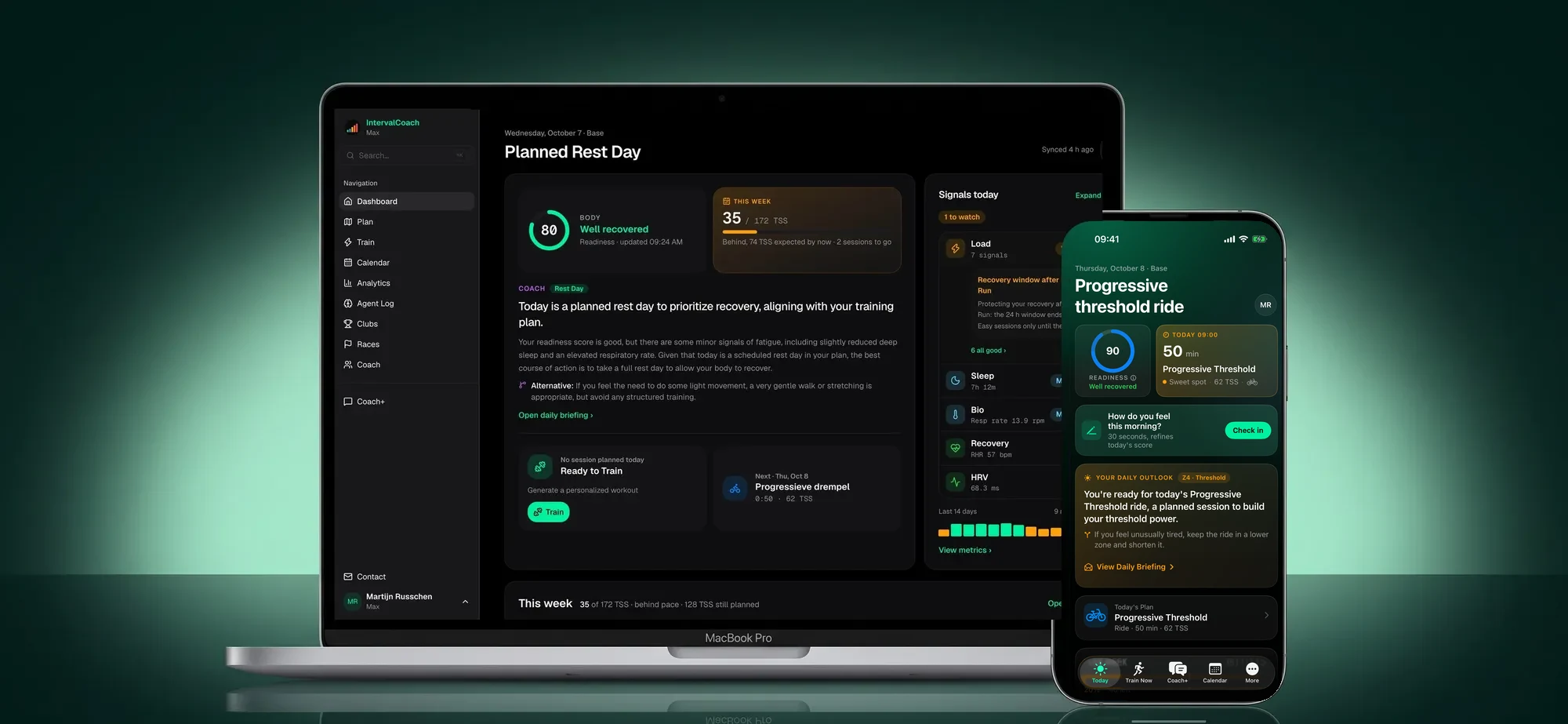
Two things change in IntervalCoach today. The app has a new design, on the web, the iPhone and Android. And there is a workout builder, so you can change any planned session, or build your own, step by step.
Neither changes what IntervalCoach is for. It is built on three ideas: your plan should read your own body, aim at your real goal, and stay yours. The new design and the builder make each of those easier to see and to use, so you can act on them every day.
1. It reads your body, not an average
Your readiness, sleep, HRV and recovery are measured against your own baselines, and your recovery curve is fitted to you. That has always been the core of IntervalCoach. The new design puts it where you look first.
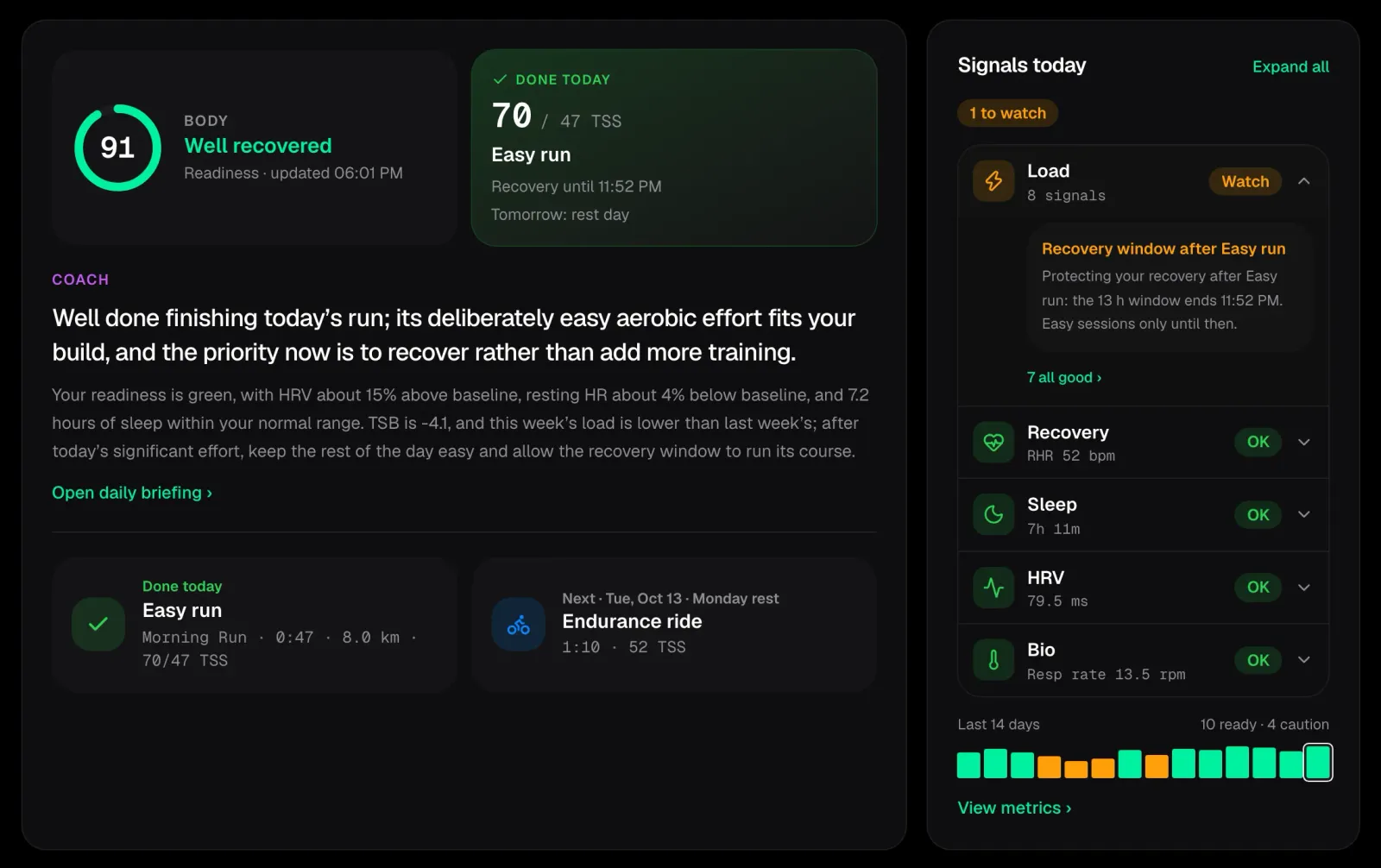
Your readiness sits at the top, and next to it a new focus tile shows the one thing that matters most right now. It changes with your day and week: a race in the next seven days, a health signal worth your attention, the session you just finished, a spike in your training load, your next session, a rest day, or how your week is going against its target.
Below it, the coach's outlook tells you what today means for you and why, and your signals are grouped into recovery, sleep, HRV, load and body. The area that needs attention opens first.
What it changes: you see in a few seconds whether today is a day to push or a day to hold back, and why. So you train hard on the days your body can take it, and ease off before tiredness turns into a lost week.
2. It plans toward your real goal
Your plan is built backwards from your race: its date, its course when you add one, and the fitness you need on the day. The new design shows you whether you are on the way there.
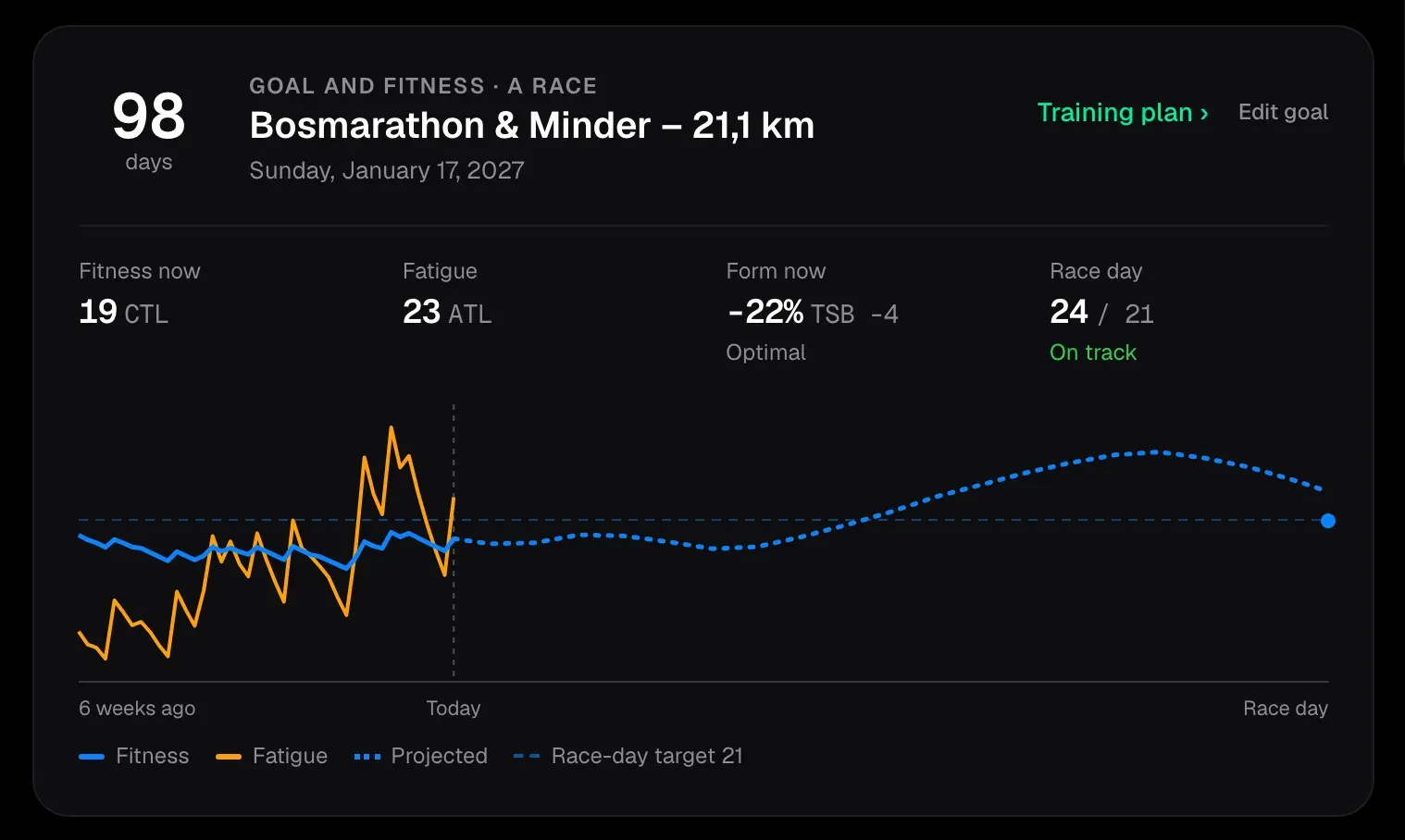
The goal card shows your fitness, fatigue and form today, and one chart from six weeks ago to race day: where you came from, where your plan takes you, and the fitness you are aiming for. This week shows your last seven weeks of training load beside the current one, with this week's target outlined, so you see straight away whether this is a normal week for you.
A finished session shows what you actually did: your real time, distance and training load, with the plan alongside. Tap it and you land on the activity and its analysis.
What it changes: you know early whether you are on track, not in the last week before the race. A missed week or a big one shows up while there is still time to adjust.
3. It stays yours: the new workout builder
A plan you don't follow doesn't make you fitter. You know things the data doesn't: a group ride, a course your club coach wants you to practise, a session from a book you trust. So the plan has to let you change it, and then plan around your choice.
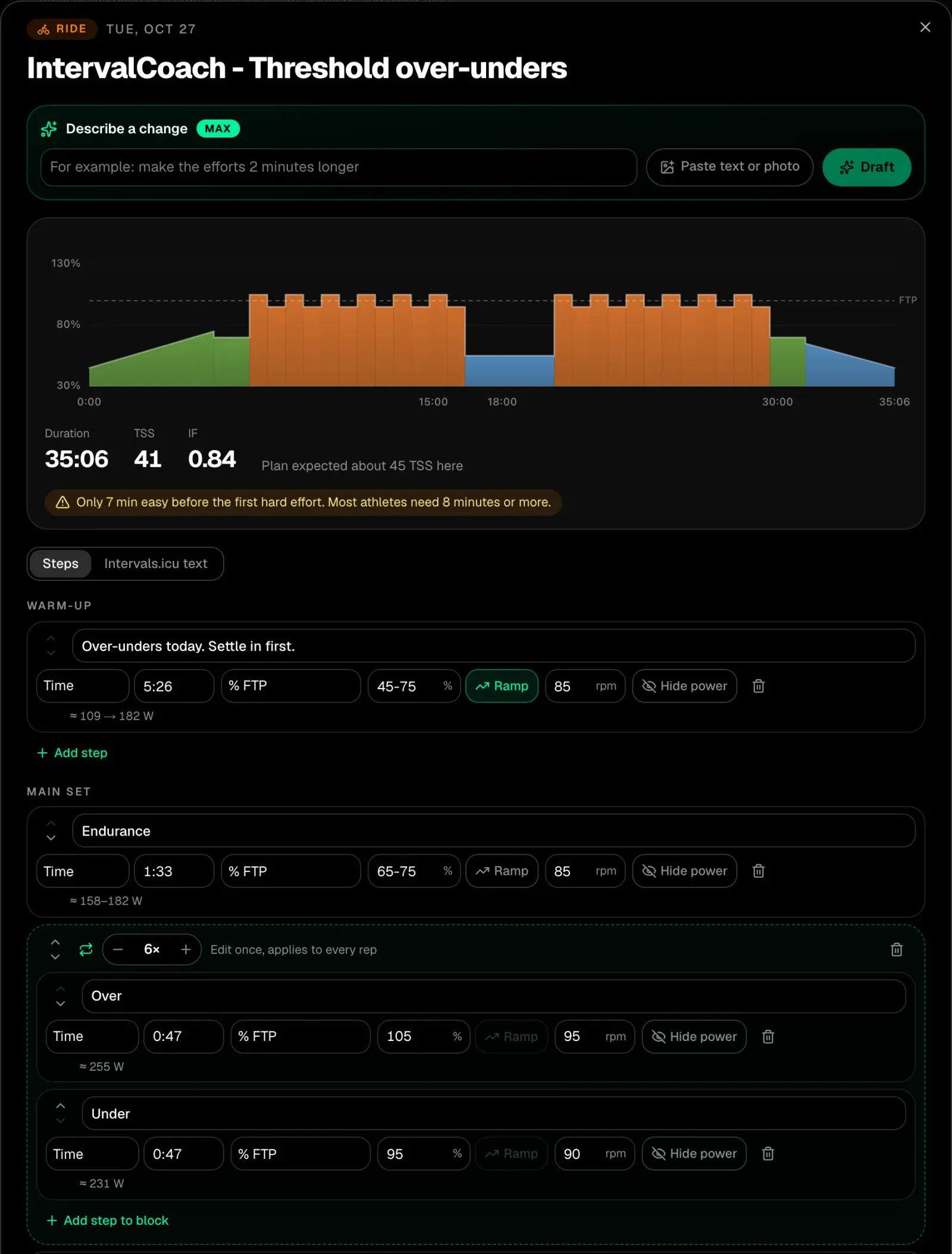
Open any planned session and choose Edit workout, or press + in the calendar to build a new one. Change a duration, a target or the number of reps, and the chart, time and load update as you go. Save, and it goes straight to your calendar, so it syncs to your watch, bike computer or Zwift like any other session. Your version is kept, and the rest of your week is planned around it.
It works for rides, runs, trail runs, swims, walks, hikes, rowing and Nordic ski, with targets in power, pace or heart rate, and steps that run by time, distance or until you press lap.
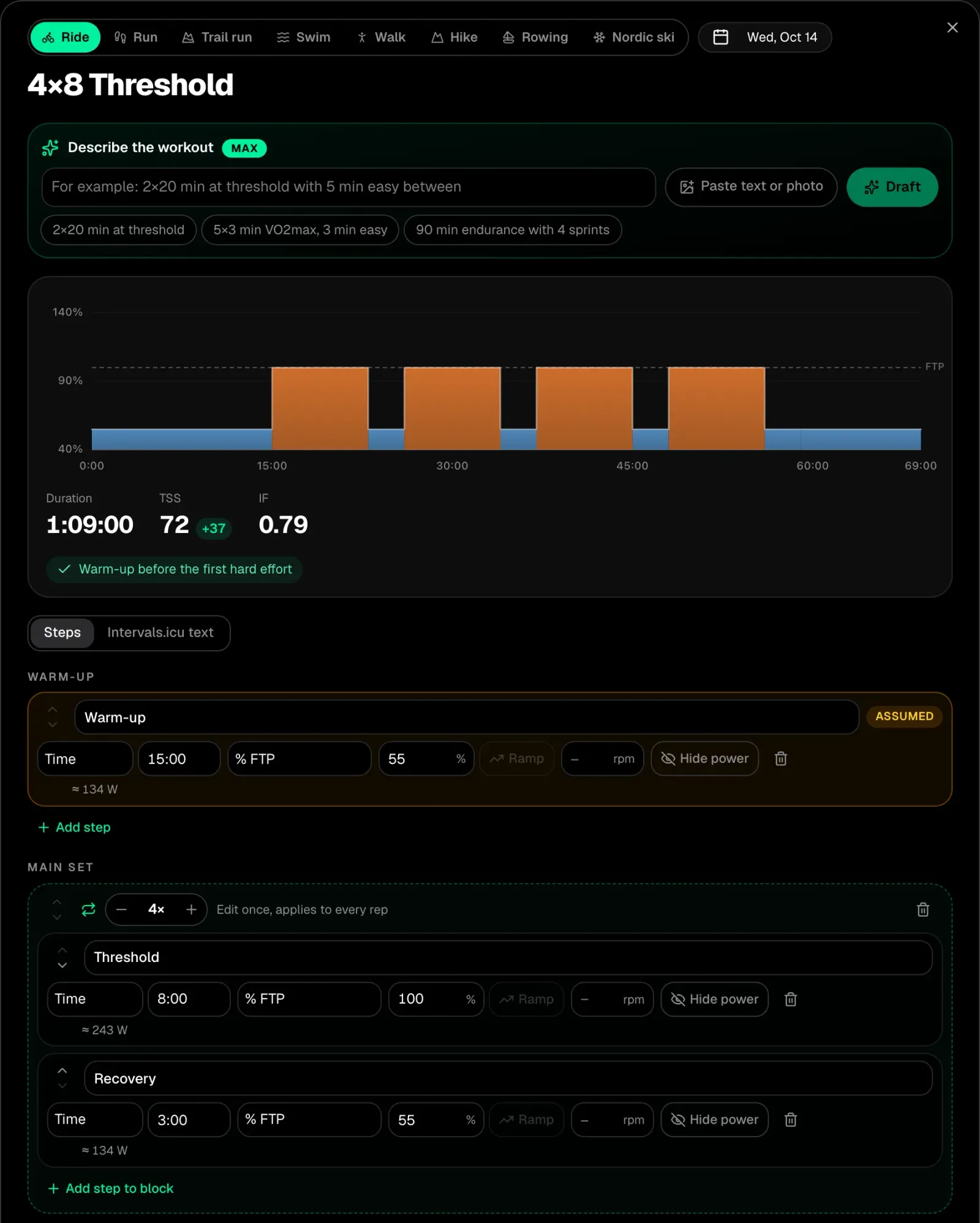
On Max, you can also just describe the session, "4x8 min at threshold with 3 min easy between", or add a photo of one from a coach or a book, and the builder writes the steps. Anything it had to assume is marked, so you know what to check before you save.
Coach+ now sits beside whatever you are looking at, so you can ask about a session or a chart while it stays in view. When a conversation needs more room, open it full page: your conversations on one side, and on the other what Coach+ sees about your day.
What it changes: the plan bends to your life instead of the other way round, without losing track of your load. That makes it a plan you keep following, and consistency over a season is what builds fitness.
And a lot of small things
- Colour that means something. Each sport and area has its own colour, and today's outlook is tinted by how hard the session is.
- Distance on planned sessions. Planned runs, walks, hikes and swims show their estimated distance, so you can pick a route before you head out.
- Race day reads as race day. A day with a race never shows as a rest day, anywhere.
- Recovery times name their day. "Until 20:52", "until tomorrow" or the weekday, in your own language.
- Every page follows the same design: the calendar, the training plan, analysis, Train and settings.
How to get it
Everything is live today, on every plan. On the web, just open IntervalCoach. On the iPhone and Android, update the app.
Thank you
The new design spent its last weeks in beta, and the athletes who tried it and reported back on the Intervals.icu forum shaped a lot of what you see today. A planned race that showed as rest, a week that looked unfinished after you finished it, the training stats one of you missed on the home screen: many of these fixes started with one of your posts. Thank you.
If something looks off, or you miss something from before, tell me through the chat in the app or on the forum.
Martijn
Frequently asked questions
What changed in the new IntervalCoach design?
The new design puts today first. Next to readiness, a focus tile shows the one thing that matters most right now, with the coach's outlook and your signals for recovery, sleep, HRV, load and body underneath. This week and the goal card show your training trend against your goal. Finished sessions show what you actually did next to the plan. Coach+ can sit beside the page or open full page, and the calendar, training plan, analysis, Train page and settings were all refreshed.
What does the focus tile next to readiness show?
It shows the one thing that matters most at that moment: a race within the next seven days, a health signal, the session you finished today, a spike in training load, your next session, a rest day, or how your week compares with its target.
What is the workout builder?
The workout builder lets you edit a planned workout step by step, or build a new one, and save it straight to your calendar so it syncs to your devices. It works for rides, runs, trail runs, swims, walks, hikes, rowing and Nordic ski, with power, pace, heart rate, cadence and distance targets, repeats and until-lap steps. Your edited session is kept, and the rest of your week is planned around it. It is on for everyone, on every plan, on the web and in the iPhone and Android apps with the latest update. On Max you can also describe a workout in words or add a photo of one, and the builder writes the steps for you.
What makes IntervalCoach different from a fixed training plan?
Three things. It reads your own body: readiness and recovery are measured against your own baselines, not a population average. It plans toward your real goal: your race, its course and the fitness you need on the day. And the plan stays yours: you can change any session, and the coach plans around your choice instead of overwriting it.
Is the new design on the iPhone and Android apps?
Yes. The new design is the default on the web, in the iPhone app and in the Android app. Update the app to get it.