How IntervalCoach plans and adjusts your training
A periodized plan toward your goal, and a check of your recovery before each session that adjusts the workout when the data calls for it. Every change comes with the reason.
14 days of Pro free, no card needed.
Getting started
Connect Intervals.icu
Link your Intervals.icu account to sync your training data, power curves, and fitness metrics automatically.
AI Analyzes Your Data
Our AI reviews your CTL, ATL, TSB, recovery status, and upcoming goals to understand your current training state.
Get Your Workout
Receive a structured workout with intervals, targets, and duration optimized for your fitness level and goals.
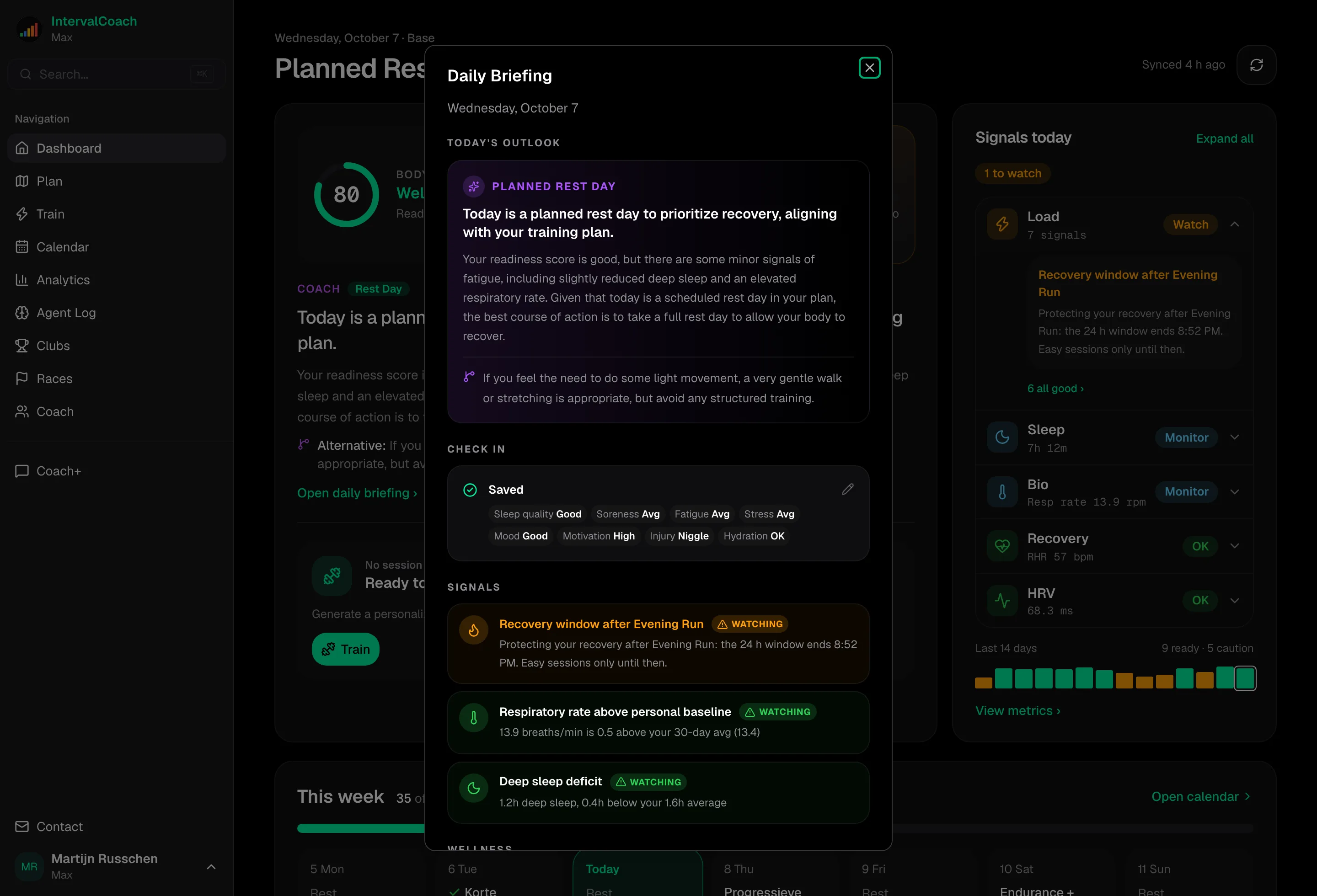
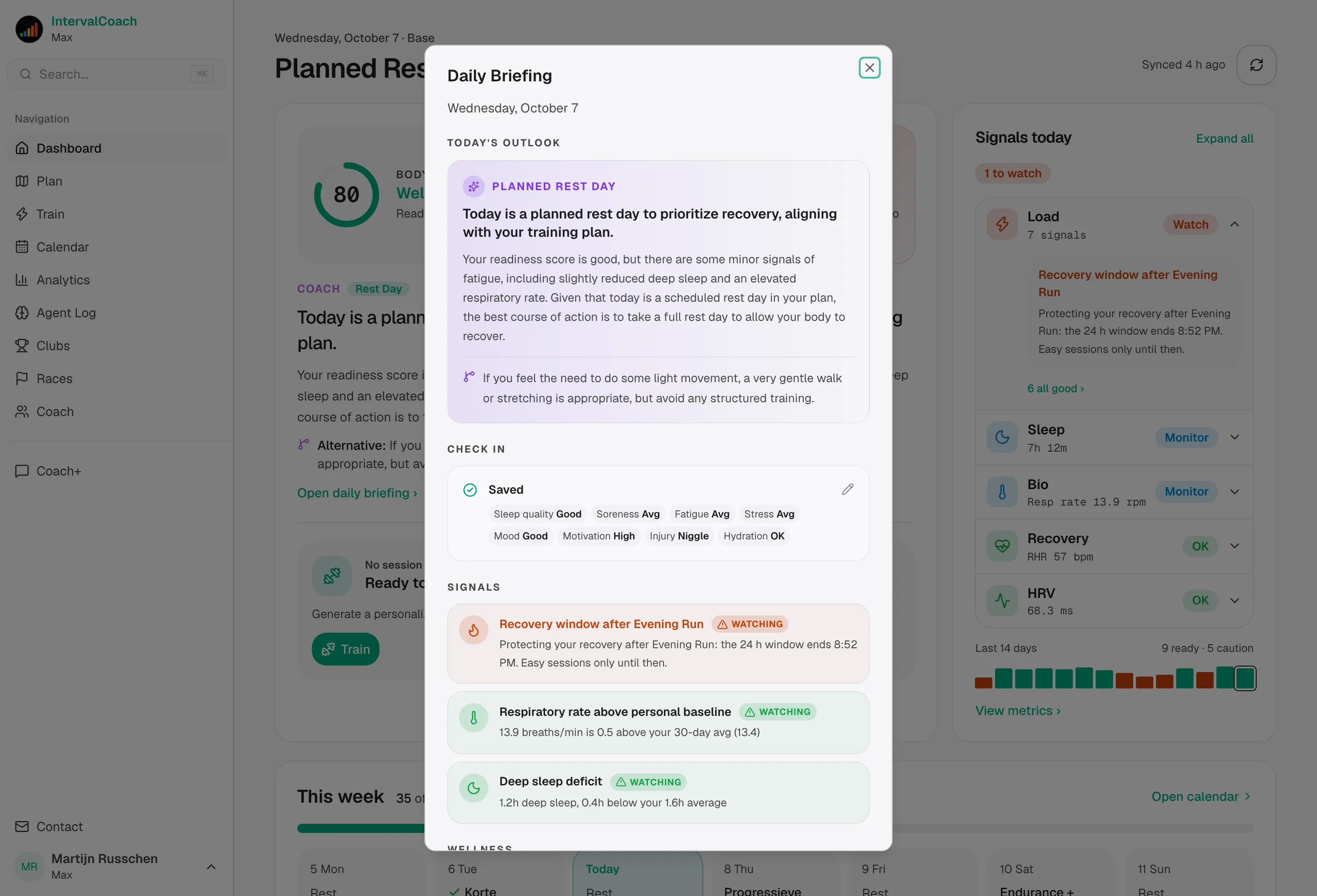
Adaptation is more than 'easier or rest'
Your signals can reshape today's workout in many ways, adjusting the warm-up, capping intensity, swapping the workout type, or adding a breathing block to the cooldown. The coach picks what fits.
Today's signals reshape today's workout.
- +5 min warm-upsore legs
- Intensity capped (Z5 → Z3)yellow recovery
- Breathing block addedHRV suppressed
What sets IntervalCoach apart
Most AI coaches write a plan and hope you show up matching it. IntervalCoach re-checks every morning, and if today doesn't match the plan, the workout reshapes itself before it reaches your inbox.
Five checks run every morning before your workout email goes out. Each one can stop the pipeline or reshape the session.
Health check
Sick or injured on your calendar? You get a rest day with recovery guidance. Coming back, hard sessions return step by step, and the reduced load lifts early once your recovery signals are back to your own normal.
Calendar priority
A or B race today? No extra workout is added, you get pre-race guidance instead. A group ride on the calendar is treated as the session. Your own planned workouts are always respected.
Readiness assessment
Over 60 signals: your readiness score, HRV (with coefficient-of-variation tracking), TSB, sleep debt, SpO2, skin temp, ACWR, consecutive days, subjective wellness, RPE feedback, aerobic durability, are evaluated together. Compound patterns matter more than any single reading.
Reshape the workout
When conditions aren't perfect the coach doesn't just reach for one dial. Load reduces, intensity caps, the stimulus swaps, the warm-up extends, or a structured breathing block joins the cooldown. Multiple adjustments can stack, the most restrictive combination wins.
Generate and steer
A concrete structured workout lands on your Intervals.icu calendar, syncing to Zwift and your head unit. Mid-week steering also keeps you on the weekly TSS target, if yesterday was way over, today dials back; if you're behind, remaining days scale up within safe bounds.
Every change is concrete
An extended warm-up is five extra minutes of low-zone work in your structured workout file. A breathing cooldown is a dedicated segment that Intervals.icu and Zwift sync to your head unit. A stimulus swap changes the workout type the selector actually picks, not just a label in the email.
A week, adapted
Plan says threshold intervals. Readiness score lands at 45 (HRV suppressed, TSB -16). Same threshold workout, TSS down 15%, one fewer interval.
Recovery drops to 28% (red) after poor sleep. The VO2max session is replaced with a 45-minute easy spin and a note explaining why.
Recovery back to 72%, but weekly TSS is at 35% with three days left. Thursday's session is scaled up ~20% to get the week back on pace.
Saturday's group ride blew past the plan (180 vs 120 TSS). The load delta catches it and trims Sunday's endurance ride by 25%.
Self-reported soreness 4/5, HRV suppressed for the third day. Sweet Spot keeps total duration but picks up three adjustments: longer warm-up, intensity cap drops the main set to Tempo, and a dedicated box-breathing block closes the session.
When a human coach is in the loop
Some athletes coach themselves with the AI; others work with a human coach who's been in their corner for years. IntervalCoach handles both. The coach gets the same dashboard the athlete does, can edit the weekly plan, and joins the Coach+ chat thread. Coaching instructions the human writes flow into every plan the AI generates.
How the Coach Plan works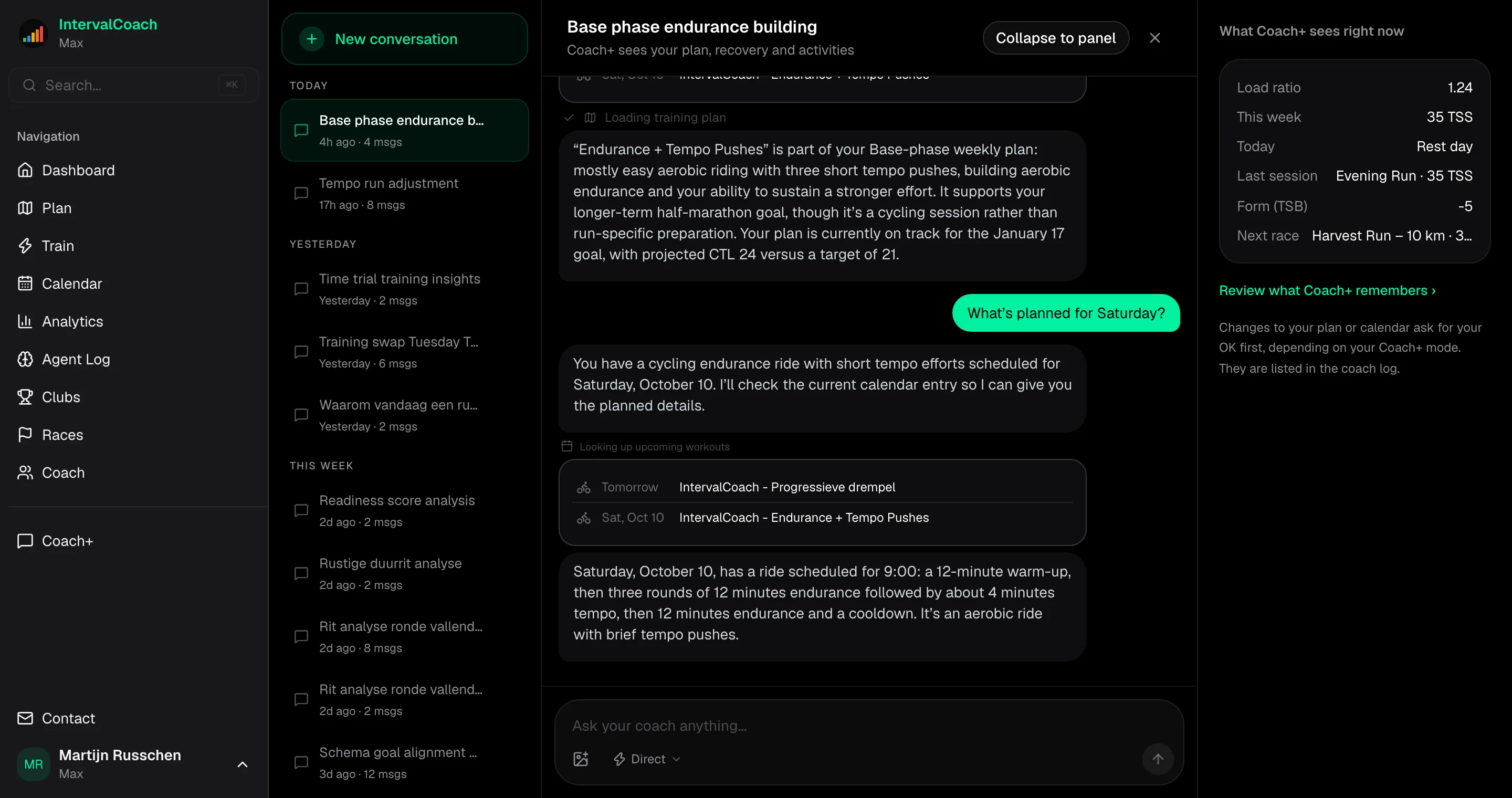
Train with your club
Training is easier when you're not doing it alone. Create or join a club and the people you ride and run with become your push: a shared feed where everyone sees each other show up, fair leaderboards that reward consistency over raw watts, a weekly AI summary of how the group is doing, and shared events that drop into each member's own plan. You choose what you share, your recovery and wellness data never leaves your account.
Read how Clubs workFeatures
Weekly Training Plans
Each Sunday, AI maps out your week's training structure. Then workouts are generated one per day, 7 days ahead, always fresh and adapted to your latest data.
Daily Adaptive Training
Each workout reshapes itself around how you are feeling today. Sore legs get a longer warm-up, a poor night of sleep lowers the intensity, low HRV adds a breathing cooldown, always in sync with your signals.
Smart Workout Generation
AI-powered workouts based on your power zones, training phase, recovery, and learned preferences.
Recovery Awareness
Monitors HRV, sleep, resting heart rate, and training load from whichever sources you've connected, Intervals.icu, Whoop, or Apple Health (Apple Watch, Oura, scales, period trackers). Over 60 signals feed into the daily readiness call so rest days are earned, not guessed.
JustTrain On-Demand
Need a workout right now, or want to plan ahead? Generate a session for today based on your current readiness, or schedule one to any upcoming day on your calendar.
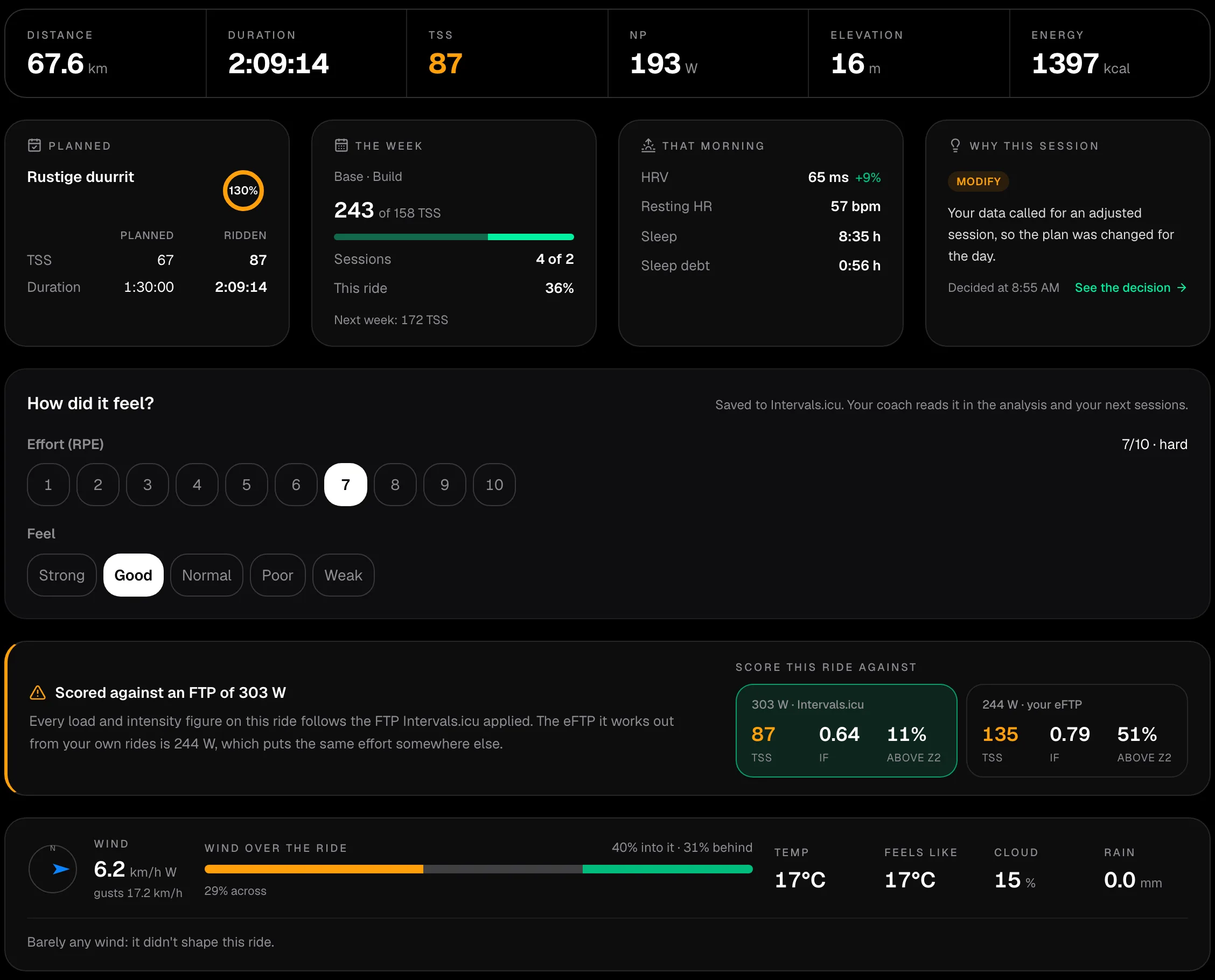
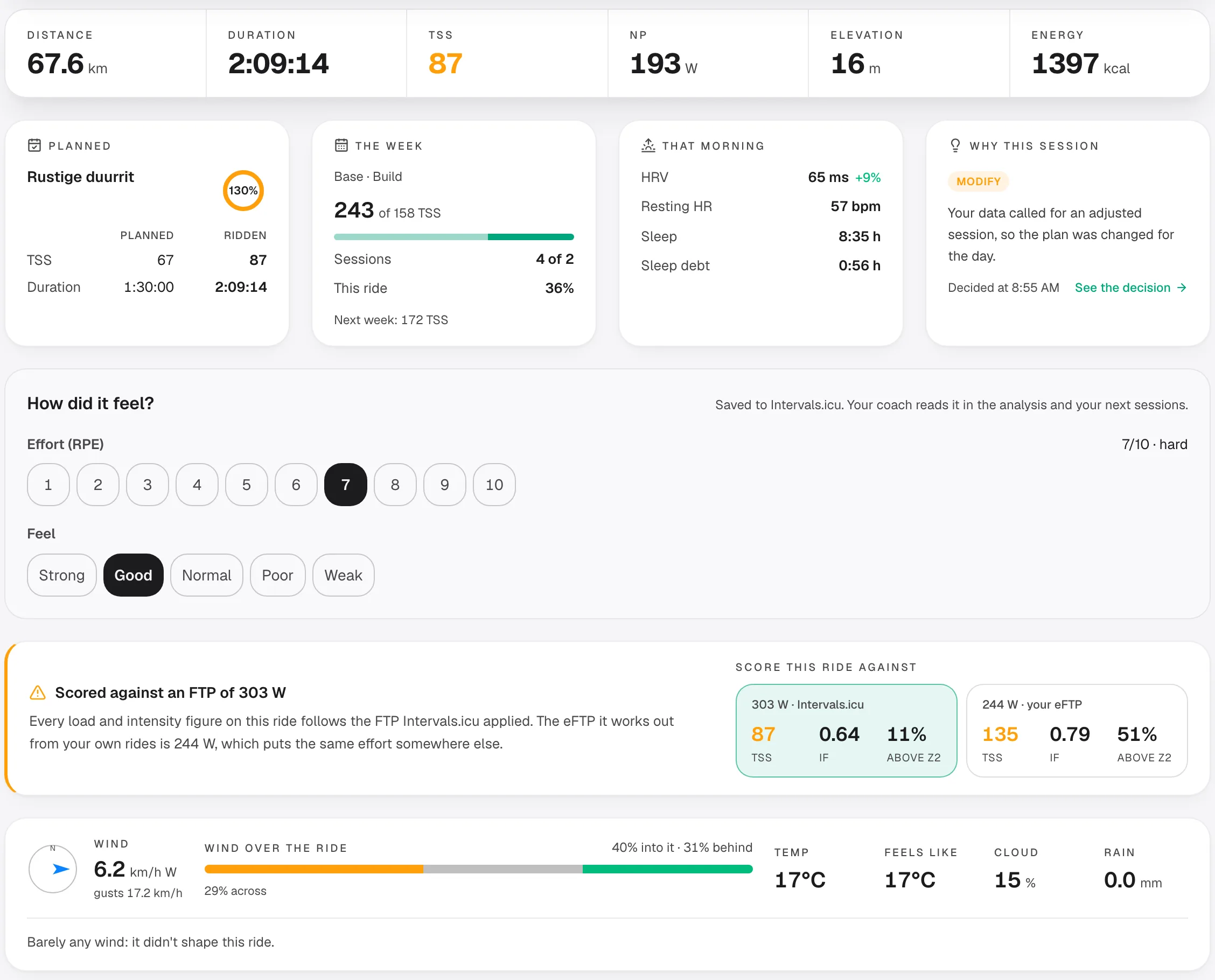
Post-Workout Analysis
Compare each workout against similar past efforts to track power and HR trends. Get fatigue warnings when overreaching signals appear.
Smart Periodization
Automatic base, build, and peak phases leading to your goal, polarized or pyramidal model, whichever fits your training style best.
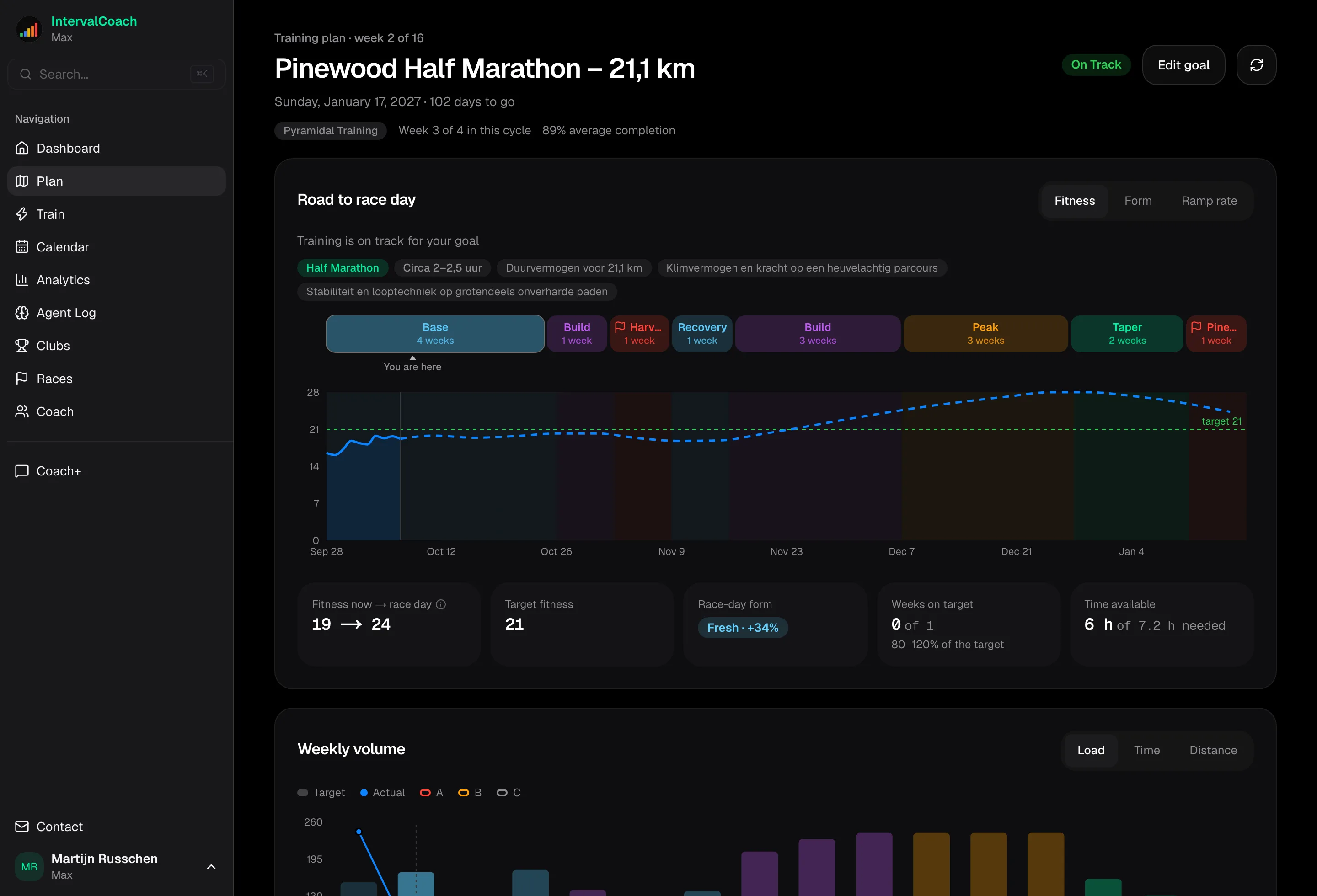
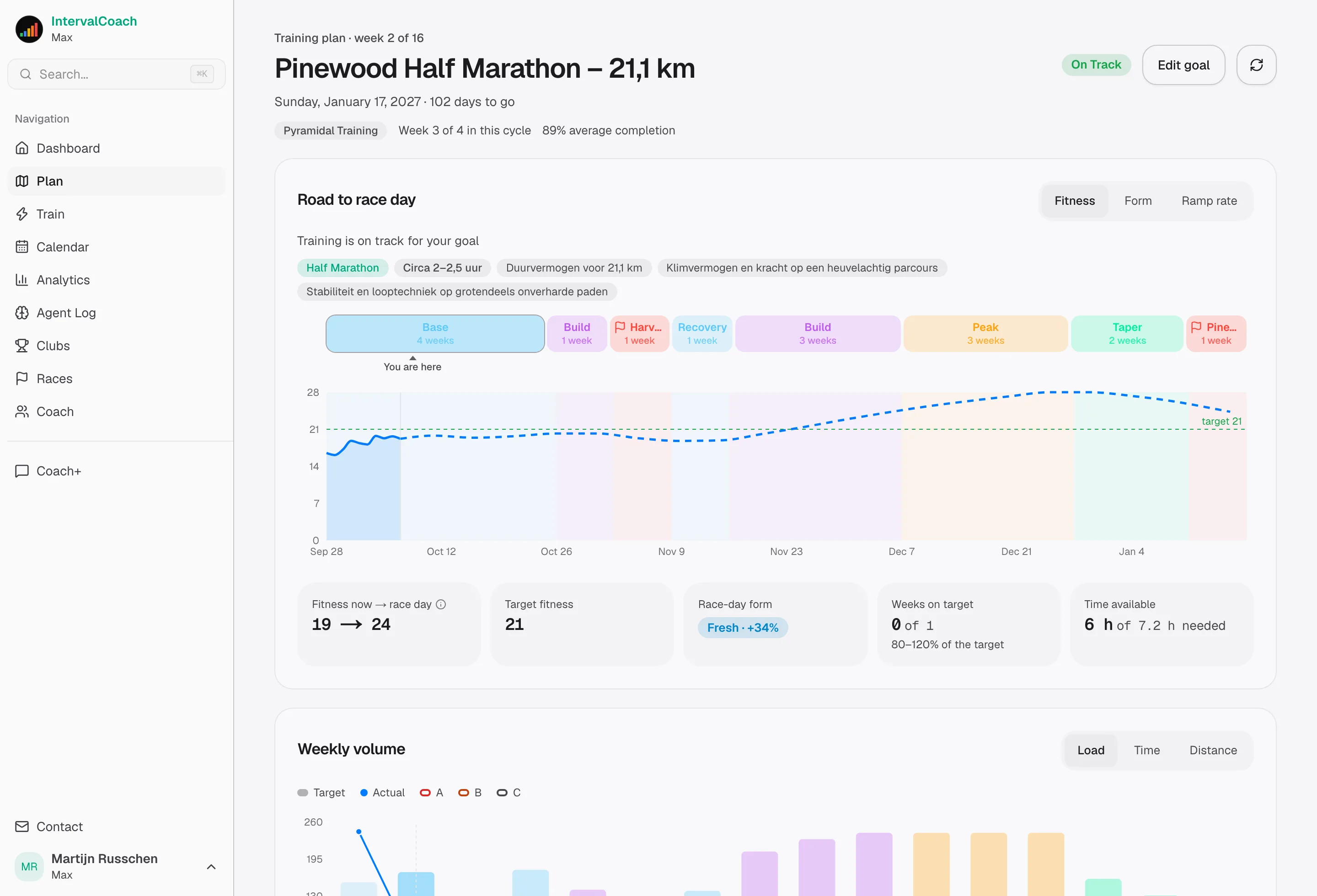
Fitness Dashboard
Track CTL, ATL, TSB, HRV, and recovery metrics with visual trends.
Goal Tracking
Set race goals or pick from six non-race templates: General Fitness, Return to Sport, Off-Season Base, Weight Management, Speed/Power Block, and Maintenance. Track progress with fitness projections toward target CTL.
Multi-Sport Support
Cycling, road running, trail running, swimming, walking, hiking, and strength, all personalized. Trail runners get terrain-aware analysis (elevation, gradient, power-hike thresholds) and trail-specific workout templates like Long Climb, Downhill Repeats, and Ultra Time-on-Feet. Run with a power meter (Stryd / Garmin) and get targets as % of running FTP, or ride outdoors without power and use HR-based cycling zones. Walks and hikes are duration-based with HR caps, no interval structure, just time on feet.
Nutrition Advice
Get pre-workout, during, and post-workout nutrition guidance tailored to each workout's intensity and duration.
Race Pace Plans
Get AI-generated race day strategies with pacing guidance, warm-up protocols, and scenario-based advice for your A, B, and C priority events. With a course attached, targets and fuel follow its climbs and the wind forecast.
Race Recon
Attach the GPX or FIT file of your race. IntervalCoach finds every sustained climb, favours intervals as long as your climbs, and plans race day segment by segment with pacing and fuel.
Direct Upload
Push workouts directly to Intervals.icu calendar for Zwift/Wahoo sync.
Coach+ AI Chat
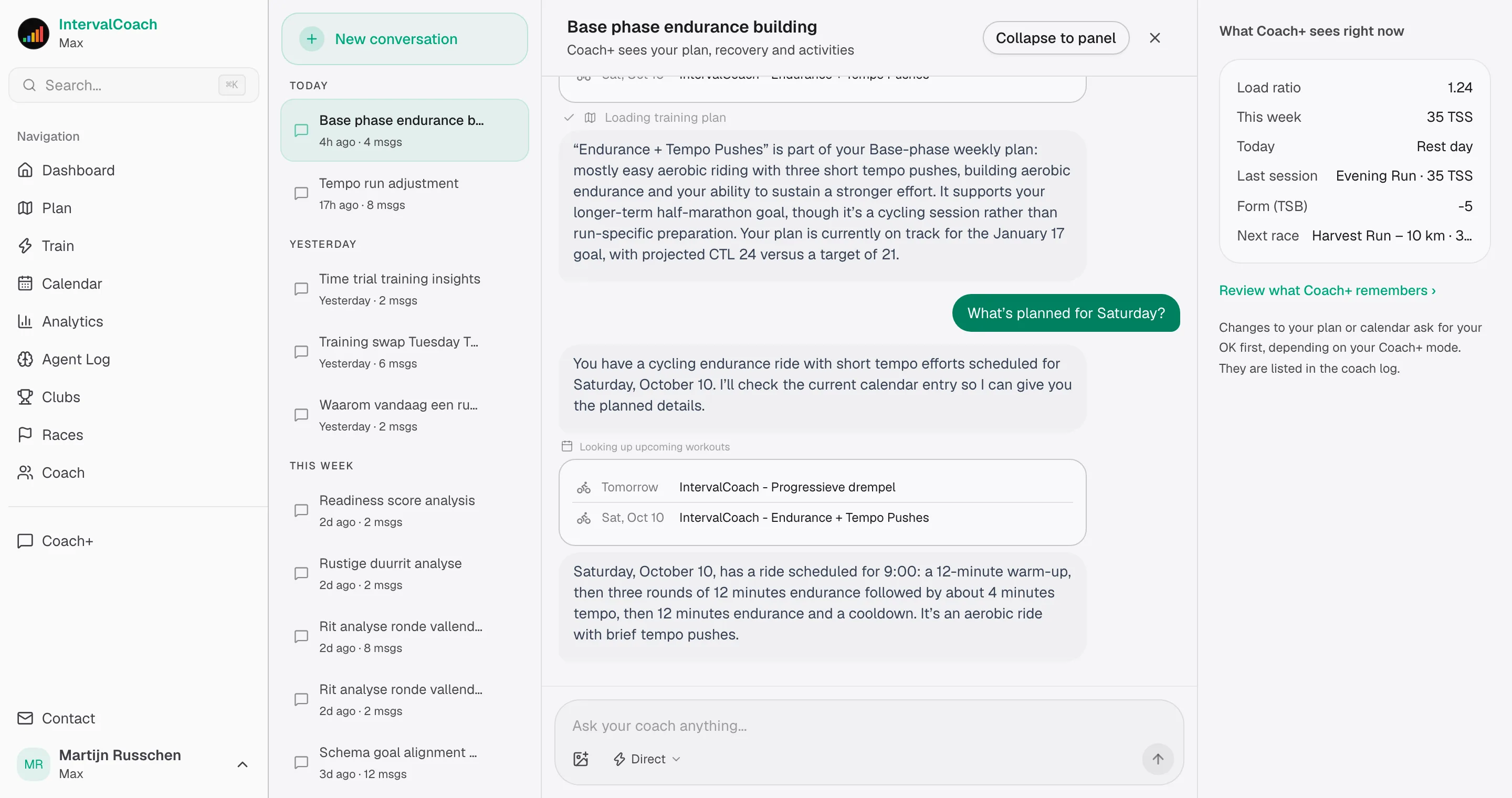
Multiple parallel conversations, each with an AI-generated title. Context-aware prompts based on today's workout and readiness. Ask Coach+ to rebuild your weekly plan, build a custom workout from plain language, or manage race events, all from chat.
Coach+ Remembers You
Your coaching instructions and memories ("focus on threshold", "avoid VO2max mid-week") carry across chat sessions and actually influence workout selection and the weekly plan, not just future replies.
Public Profiles & Shareable Activities
Enable a public profile with your own handle and share your training milestones. Individual activities get their own shareable page with rich previews on Twitter, Strava forums, and messaging apps.
Training Demand Control
One control, Easy, Moderate, Demanding, or Aggressive, dials your weekly TSS targets across the whole plan. Tune the intensity to your life without touching the engine.
Drag-and-Drop Calendar
Reschedule planned workouts by dragging them between days. Richer workout cards show duration, TSS, and sport at a glance. On mobile the calendar switches to a clean vertical list of training days.
Analytics & Insights
Fitness Trends
Visualize your CTL, ATL, and TSB over time. See how your fitness evolves and track progress toward your target CTL.
Zone Analysis
Track training distribution across power and heart rate zones. See trends showing which zones are improving or need attention.
AI Health Insights
Get early warnings for elevated resting heart rate, low HRV, and overtraining signals before they become problems.
Training Science Suite
Polarization index, intensity distribution, training monotony, ACWR spike detection, aerobic durability trend, and a consistency index that tracks how well you follow your own plan.
AI Coaching Notes
Get personalized coaching advice with each workout: why this session matters, what to focus on, and how it fits your training plan.
Goal Projection
See your predicted CTL on your goal date based on current training, plus the weekly TSS needed to hit your target fitness.
Power Profile Radar
See your strengths across 8 durations (5s sprint to 60-min endurance) on a single radar, plus a power-duration curve overlaying current vs all-time. Peak powers table shows peer P50 values for each duration.
Body Weight Trend
If you log weight in Intervals.icu, the Analytics page plots your weekly average over time. Coach+ can also reason about your W/kg and body composition trend.
Performance Benchmarks
Compare your fitness, power, and pace against similar athletes. Filter by age group and sex for relevant peer comparison. Max tier exclusive.
Requirements
Intervals.icu Account
IntervalCoach uses Intervals.icu as its data source. You'll need a free Intervals.icu account connected to your training platform.
Setting Up Intervals.icu
- Create a free account at intervals.icu
- Connect your training platform (Strava, Garmin, Wahoo, etc.) in Settings
- Wait for your historical data to sync (may take a few hours)
- Come back here and log in with your Intervals.icu credentials
Zwift Integration
To use generated workouts in Zwift:
- Workouts are uploaded to your Intervals.icu calendar
- In Intervals.icu Settings, connect your Zwift account
- Enable "Sync workouts to Zwift" in the integration settings
- Workouts will appear in Zwift under Custom Workouts
Wahoo SYSTM/ELEMNT Integration
For Wahoo devices:
- Connect Wahoo to Intervals.icu in Settings
- Workouts sync to your Wahoo calendar automatically
- Access them on your ELEMNT or in SYSTM app
TrainerRoad Integration
For TrainerRoad users:
- Connect TrainerRoad to Intervals.icu for activity syncing
- Generated workouts can be exported as .zwo files
- Import .zwo files into TrainerRoad's custom workout builder
Frequently asked questions
What is IntervalCoach?
IntervalCoach is an AI training coach for cycling, running, triathlon, swimming, strength and HYROX. It works on top of Intervals.icu: it reads your training history and your overnight recovery data, decides what today's session should be, and writes a structured workout to your calendar before you wake up.
How does IntervalCoach adapt my training each day?
Five checks run before the session reaches you. A health check looks for illness or injury on your calendar. Calendar priority protects an A or B race, a group ride or a workout you planned yourself. The readiness assessment weighs over 60 signals across 11 categories. The reshape step adjusts the session. Generate and steer writes the structured file to Intervals.icu and keeps the week on its TSS target.
What does an adaptation actually change?
The workout file, not the wording. Load reduces, intensity caps, the stimulus swaps, the warm-up extends by five minutes of low-zone work, or a structured breathing block joins the cooldown. Multiple adjustments can stack and the most restrictive combination wins — so a day at 45% recovery might keep its threshold session but drop 15% of the TSS and one interval.
Can I keep working with my human coach?
Yes. Your coach sees the same dashboard you do, can edit the weekly plan, and joins the Coach+ chat thread. Their instructions carry into the sessions the AI writes.
Which devices and apps does IntervalCoach work with?
Workouts sync out to Garmin, Wahoo, Polar, Coros, Suunto, Amazfit and Hammerhead head units, and to Zwift, MyWhoosh, Rouvy, Biketerra and Concept2 indoors. Recovery data comes in from Whoop, Oura, Apple Health, Google Health, Fitbit, Pixel Watch, Google Fit and Huawei Health. Everything reaches IntervalCoach through Intervals.icu.
What happens in the week of a race?
An A or B race on your calendar stops extra work being added on the day, and you get pre-race guidance in its place. A group ride already on the calendar is treated as that day's session rather than something to train around.
Have questions? Check out our FAQ
What do athletes say about IntervalCoach?
IntervalCoach is rated 4.8 out of 5 from 219 ratings across the App Store and Google Play. Below are reviews from both stores, plus athletes we have featured on the blog.
4.8from 219 ratings across the App Store and Google Play“Finally a well executed adaptive app that truly feels "worth it". The interface is clean and well thought out and simply talking to the AI coach can restructure your calendar. Using intervals.icu as the hub, these changes update my Garmin computers automatically.”
“I've been using IntervalCoach daily for more than six months. IC uses AI to provide adaptive training plans, detailed workouts, readiness, load management, etc. All of this is packaged in an attractive and intuitive UI. IC has helped me develop a long term plan (and stick to that plan!) for future A-races. […] This app provides the best combo of functionality, speed of development and affordability.”
“The App is made for athletes. Very good overview of all helpful details, when you start in a new training day (sleep, HRV, mood, etc. is analyzed and your training plan adapted if needed e.g. if HRV is low or you had a bad sleep). […] For me it is the best App on the market so far!”
“I am extremely grateful for your continuous updates and improvements to the functions over the years. The combination of intervals training and the coach's guidance has been of great help to my training and recovery.”
“Exactly what I've always been looking for: AI-supported training using all available data! Very fair prices! There was a bug in an earlier version. The developer contacted me immediately and fixed it. You couldn't ask for better or faster support. A well-deserved 5 stars!”
Every week we feature one athlete's training. Read the spotlights
Ready to Train Smarter?
Connect your Intervals.icu account and get your first AI-generated workout.