In the previous post, I explained how IntervalCoach builds your weekly plan: goal-driven phases, weekly TSS targets, and a rolling four-week calendar of workout slots. But a plan written on Sunday does not know that you slept terribly on Wednesday, or that your recovery tanked after Tuesday's race. That is where daily adaptation comes in.
Every morning, before your workout email goes out, a five-step pipeline checks whether the planned workout still makes sense for how you are feeling right now. If it does, you get the original workout. If it does not, the system adapts it. And because data rarely keeps office hours, the same assessment runs again whenever fresh data lands later in the day. More on that below.
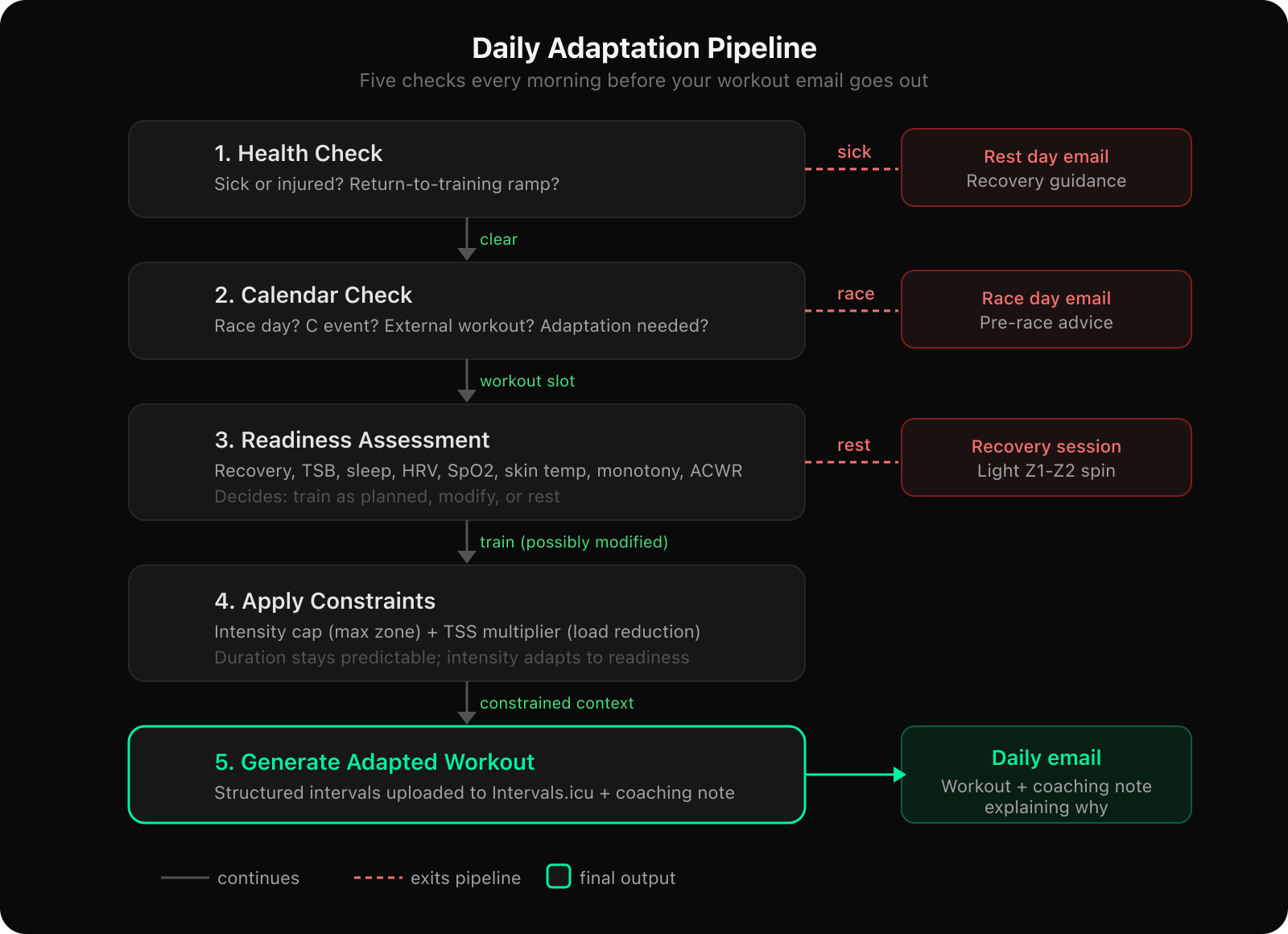
Here is how each step works.
Step 1: Are you sick or injured?
The first check is the simplest. The system looks at your Intervals.icu calendar for a SICK or INJURED event. If one is active today, the pipeline stops immediately. No workout, no nudging. You get a rest day email with recovery guidance.
The interesting part is what happens after you recover. Training comes back gradually. Hard sessions return step by step, the reduced load lasts longer after a longer illness, and it lifts early once your resting heart rate, HRV and recovery are back to your own normal.
This prevents the common mistake of feeling better and immediately jumping back into hard intervals.
Step 2: What is on your calendar?
Next, the system checks what is already on your calendar for today:
- A or B race: No workout generated. You get a race day email with pre-race advice.
- C event (group ride, fun ride): That is your workout for today. No need to pile on more training.
- External workout from another source: If you have your own workout planned, the system respects it.
- Weekly plan workout: This is the most common case. The system checks whether conditions have changed enough since the plan was created to justify adapting it.
That last point is important. The system does not re-evaluate your workout from scratch every day. It compares your current recovery and fatigue to what they were when the plan was created. Small fluctuations? Keep the original. Significant shift? Adapt.
Step 3: Should you rest?
This is the heart of the adaptation system. Multiple signals feed into a readiness assessment that decides: train as planned, modify the workout, or skip it entirely. (The score that assessment produces got a rebuild of its own, which I wrote about in Your readiness score grew up.)
The signals it checks:
Readiness score. Your HRV, resting heart rate and sleep, each against your own baseline, add up to a readiness score from 0 to 100. They come from whichever wearable you use: Whoop, Oura, Garmin, Apple Watch or anything that syncs to Intervals.icu. In the red (below 34), today becomes a rest day. Amber means caution, green is good to go. The recovery percentage Whoop or Oura calculates for itself is not used; their HRV, resting heart rate and sleep feed your readiness instead.
Training Stress Balance (TSB). This is the relationship between your long-term fitness load and short-term fatigue. A TSB below -20 means you are fatigued.
Sleep. The system does not just look at hours slept. It compares your sleep to your personal baseline using a z-score. Someone who normally sleeps 6 hours and got 5.5 is in a different situation than someone who normally sleeps 8 and got 5.5. A z-score below -1.0 triggers load reduction.
HRV and resting heart rate. These physiological signals can override sleep data. If you slept poorly but your HRV is above baseline and resting heart rate is normal, your body is telling you it has recovered. The system trusts physiology over self-reported sleep. Beyond single-day readings, the system also tracks your HRV coefficient of variation (HRV-CV) over a rolling window. A volatile HRV-CV indicates autonomic instability, a stronger fatigue marker than one low reading. Critically volatile HRV-CV triggers an automatic rest day.
SpO2 and skin temperature. Wearable biometric data adds another layer. Blood oxygen below 95% is a warning. Skin temperature elevated more than 0.5 degrees above your 30-day baseline flags potential illness before you even feel symptoms.
Consecutive training days. Five or more days in a row with only moderate recovery? Time for a break.
Training monotony. If your daily training load has been too similar day after day, overuse risk increases. High monotony combined with moderate fatigue triggers a rest recommendation.
Acute-to-chronic workload ratio. A spike above 1.5 means your recent load has jumped too fast relative to what your body is adapted to. The system reduces load to lower injury risk.
Respiratory rate. An elevated overnight respiratory rate (above 18 breaths/min) can indicate early illness or stress, even when other metrics look fine.
Deep sleep and sleep debt. Beyond total sleep hours, the system checks deep sleep specifically (under 1.5 hours is a deficit) and accumulated sleep debt. Significant sleep debt over multiple days compounds fatigue signals.
Subjective wellness. If you log how you feel in Intervals.icu (soreness, fatigue, stress, mood on a 1-5 scale), the system uses those too. When multiple subjective markers are bad at the same time, the compound signal is stronger than any individual one.
Workout feedback. If your recent workouts have consistently felt harder than expected (high RPE scores), the system treats that as a signal that your body is under more stress than the numbers alone suggest.
Load-recovery ratio. The system compares your acute training load (recent days) against your chronic load (longer trend) using exponentially weighted moving averages. When recent load outpaces what your body is adapted to, it flags the imbalance before it turns into overreaching.
Aerobic durability. By tracking how your aerobic efficiency trends over time (power-to-heart-rate coupling), the system can detect early signs of overtraining. If your efficiency is declining despite consistent training, something is off and the system adjusts.
Plan consistency. The system tracks how closely you have been following the plan. Low adherence is not punished, but it changes the context: if you have been skipping sessions, the system does not try to cram missed volume into remaining days.
In total, twenty detectors produce more than a hundred distinct signals, grouped on your dashboard into five categories: recovery, sleep, HRV, load and biometrics. Not all apply to every athlete. If you do not use a wearable or do not log wellness data in Intervals.icu, the system relies more on TSB, training patterns, and workout feedback. It works with what it has. The more data you provide, the more precise the adaptation.
How signals become decisions
Raw signals alone do not make decisions. A priority-ordered rules engine evaluates all active signals and produces concrete actions (covered in detail in the next section). Two things are worth knowing up front:
Not every signal is allowed to act. Each signal carries a tier. actionable signals feed the rules engine and can change the session. warning signals surface on your dashboard and in the health panel, then stop there. The split exists because an experienced coach notices a single bad reading without acting on it. One suppressed HRV the morning after an evening Zwift race is a flag. A three-day trend is a diagnosis.
Actions accumulate. If poor sleep reduces your TSS by 20% and elevated skin temp caps you at Zone 3, both apply. The most restrictive combination wins. The system never needs to pick a single "most important" signal.
Phase filtering. A single warning signal that fires during a Build block does not necessarily change the workout — the engine requires two or three warning-level signals to cross the threshold, because accumulating fatigue is part of building. During a Taper or Peak phase that threshold drops to one, because getting to the start line fresh matters more than stimulus.
This layered approach means the system never overreacts to a single data point. A bad night of sleep with normal HRV results in a modest load reduction, not a rest day. But a bad night of sleep combined with red recovery and high fatigue triggers rest, because the compound signal is clear.
Step 4: How should the workout change?
When conditions are not perfect, the coach does not just reach for a single dial. Different signals call for different kinds of adjustment, and more than one can fire on the same day — the coach picks the combination that fits.
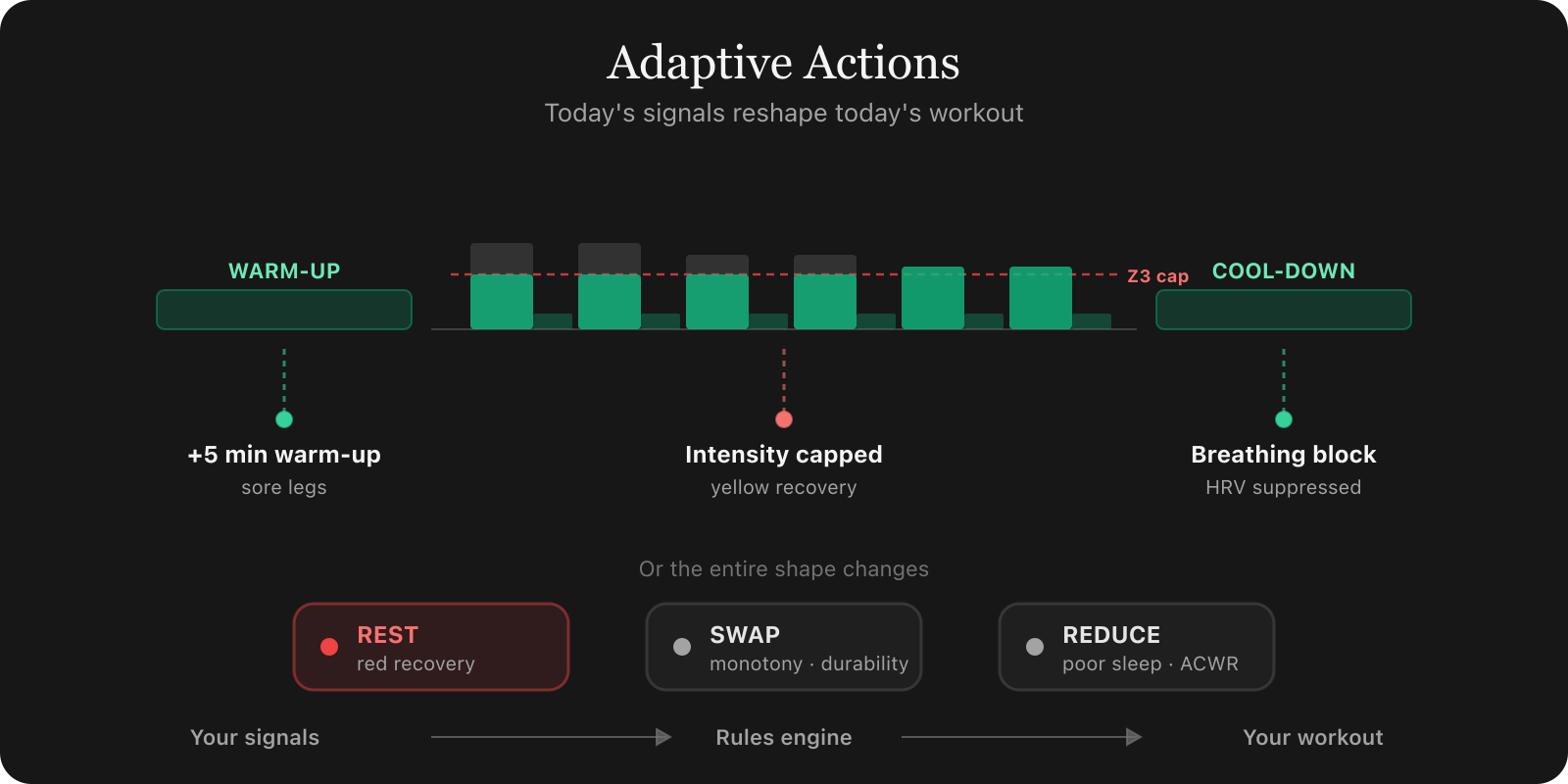
Some examples of what that looks like in practice:
- Rest. A red readiness score, active illness or injury, or HRV well below and resting heart rate well above your normal on the same morning replace today's workout with a light recovery session. You get a rest-day email explaining why.
- Reduce load. Poor sleep, sleep debt, or a training load that has ramped too fast trims the session's TSS to 70–90% of the original target. Duration stays the same so your schedule is predictable; only severe fatigue shortens the session.
- Cap intensity. Elevated HRV variability, low blood oxygen, or a deep-sleep deficit restrict the workout to a lower zone. A VO2max session becomes Tempo; threshold becomes Sweet Spot. You still train, but not at a ceiling your body cannot support today.
- Swap the stimulus. Repeated "harder than expected" feedback, high training monotony, or declining aerobic efficiency push the selector toward a different workout type — usually endurance — because that addresses the underlying cause rather than doing the same type at lower load.
- Extend the warm-up. High self-reported soreness adds five minutes of easy work before the main set, absorbed from the main set so total duration stays the same. The goal is to activate sore tissue gradually.
- Structured breathing cooldown. Suppressed HRV or low motivation combined with high stress splits the cooldown into a normal ramp-down plus a dedicated easy-zone block for parasympathetic breathing work. The coaching note prompts box breathing (4-4-4-4) during that block.
- Boost. The inverse of a reduction. If yesterday came in well under plan, or the week is running behind its target, today's session gets scaled up a little so the week still lands where it should.
- Observe without intervening. Some low-severity signals do not change the workout at all — they surface in your coaching note and dashboard so you can see what the coach is watching, even when it has decided action is not warranted today.
These are the main shapes adaptation takes today, and the list is intentionally open. As the coach learns more about what helps different athletes train better, new adaptations get added to the same rules engine — no special-case code, no model retraining.
Nothing here is cosmetic. An extended warm-up is five extra minutes of low-zone work in your structured workout file. A breathing cooldown is a dedicated segment Intervals.icu and Zwift sync down to your head unit. A stimulus swap changes the workout type the selector actually picks, not just a label in the email.
Step 5: Generating the adapted workout
With all constraints in place, the system generates the actual workout. The previous post covered how the weekly plan selects workout types based on training phase, stimulus spacing, and weekly TSS targets.
What is specific to daily adaptation is how the selected workout gets shaped by today's constraints. If the plan calls for threshold intervals but your intensity cap is Zone 3, the system picks a tempo or sweet spot workout instead. If your TSS multiplier is 0.85, it might keep the same interval structure but remove one repeat or shorten the main set.
The result is a structured workout with warm-up, intervals, and cool-down, uploaded directly to your Intervals.icu calendar. It syncs to Zwift and other apps with full power or pace targets.
When the data arrives late
Everything above describes the morning run. But data does not keep to the morning. A recovery score can land at half past nine. A watch can sync last night's HRV at lunchtime. And an activity you never planned, a hard club ride or a run you added on impulse, changes the picture for the rest of the day.
So the pipeline does not stop when the email goes out. When late wellness data arrives or an activity completes, the system re-runs the same readiness assessment against the fresh numbers and compares the new verdict against the one it recorded this morning. If nothing material moved, it notes the check and leaves your day alone. If the verdict has shifted far enough to matter, it acts on it.
Two limits keep this sane. There is an evening cutoff at 21:00 local time, because proposing a change to a session you have realistically already done or already skipped is just noise. And a mid-day rewrite only happens where the session can be reproduced faithfully, which today means rides and pace-target runs. Heart-rate-zone runs, swims and strength sessions surface the shift in your coaching note and leave the workout alone.
Who gets the last word
By default the coach applies all of this straight to your calendar. You wake up, the workout is already right, and the coaching note tells you what changed. For most athletes that is the point of the thing.
Some people would rather approve first. In Settings you can switch adaptation to preview mode, and the pipeline stops writing to your calendar. It still runs every check described above, but instead of applying the result it captures three things: the session you were originally given, the session it would replace it with, and the reason. That lands as a notification you can approve or reject from the web app, the iOS app or the email. Approve it and the calendar is updated. Reject it and the original session stands.
This matters more than it sounds. An adaptation you did not ask for and did not understand feels like the app fighting you. The same adaptation, shown with its reasoning and waiting for a yes, reads as a coach making a case.
Mid-week steering
The adaptation pipeline does not only respond to how you feel. It also tracks whether you are on pace for your weekly TSS target.
Daily load delta. After each training day, the system compares what you actually did versus what was planned. If yesterday's session was significantly harder than planned (more than 30% over target), today's session gets scaled down by up to 30%. If you went easy or skipped yesterday, today's session gets a modest boost of up to 15%. This prevents the week from snowballing in either direction after one off-plan day.
Weekly reallocation. On a wider scale, the system checks your cumulative TSS against the weekly target. If the drift exceeds 15% of the weekly target, it redistributes the remaining TSS across the days left in the week. Running behind? Remaining sessions get scaled up (capped at 1.3x). Running ahead? They get scaled down (floored at 0.7x). Small drifts within 15% are left alone to avoid over-correcting.
This means if you crush a long Saturday ride that blows past the plan, Sunday's recovery spin stays light. And if a Wednesday rest day means you are behind, Thursday and Friday sessions absorb the difference rather than piling everything onto the weekend.
What this looks like in practice
Monday morning. Your weekly plan says threshold intervals. Your readiness score reads 45 (amber), with HRV a little below your normal. TSB is -16 (tired but not fatigued). The system keeps the threshold workout but reduces TSS by 15%. You get the same type of session with one fewer interval.
Wednesday. Readiness dropped to 28 (red) after poor sleep and a suppressed HRV. The system cancels the planned VO2max session, replaces it with a 45-minute easy spin, and your email explains: "Your readiness is in the red today. Swapping hard intervals for an easy ride to let your body catch up."
Thursday. Readiness is back to 72 (green), TSB has recovered to -8. Full training resumes. But you have only completed 35% of your weekly TSS target with three days left. The weekly reallocation kicks in, scaling up Thursday's session by about 20% to get the week back on track.
Saturday. You went on a group ride that was way harder than planned, 180 TSS instead of the planned 120. The daily load delta catches this. Sunday's planned endurance ride gets scaled down by 25%, keeping the weekly total close to target without overloading you.
Friday, 10:40. Your watch synced late, so this morning's assessment ran without last night's data. The HRV that just landed is well below your baseline and your resting heart rate is up. The system re-runs the check, sees a verdict that no longer matches the threshold session on your calendar, and rewrites it as endurance. You get a notification explaining what arrived and what changed. On preview mode you would get the same notification with an approve button instead.
Tuesday of the following week. Your wellness check-in reports soreness 4/5 from the weekend. HRV is suppressed for the third day in a row. The planned Sweet Spot session keeps its total duration but picks up three adjustments: a longer easy warm-up for the sore legs, an intensity cap that shifts the main set from sweet spot to tempo, and a dedicated breathing block in the cooldown. Your coaching note explains each one, and the dashboard's Today's Plan card shows them in a compact row so you know what is different before you start.
This is the cycle that plays out every day. The plan sets the direction. The adaptation pipeline adjusts the execution. You get workouts that respect both where your training should be going and where your body actually is today.
If you want to see this in action, check the coaching note at the top of your daily email. It explains exactly why you got the workout you did. That transparency is intentional. I want you to understand the reasoning, not just follow instructions.